
Key Takeaways
- Collect only the student information needed for educational purposes.
- Restrict access to sensitive records through role-based permissions.
- Review software providers' privacy and security practices.
- Understand FERPA, COPPA and applicable state privacy requirements.
- Establish clear data retention and deletion policies.
- Set guidelines for using AI in lesson planning.
In September 2026, a data breach involving Educational Testing Service (ETS), California's statewide assessment contractor, exposed sensitive information belonging to millions of current and former public school students. The incident, reported by GovTech, brought renewed attention to how schools and their technology partners collect, access, store and protect student information.
While the breach did not involve a specific software used by teachers, it highlights a concern that extends across the K-12 technology ecosystem. That is, student data protection cannot be an afterthought. As schools adopt more digital tools for curriculum mapping, lesson planning and instructional coordination, they need to understand what information these platforms handle and what safeguards are in place.
This is particularly important when curriculum management platforms connect with student information systems (SIS), learning management systems (LMS) and other educational applications. Depending on the platform and its configuration, these integrations may involve sensitive student information or provide access to protected education records.
So, how can K-12 schools protect student data while making effective use of curriculum and lesson planning software? It starts with understanding what data these tools handle, limiting access to authorised users and evaluating technology providers carefully.
What Student Data Can Curriculum and Lesson Planning Software Access?
Curriculum documents and student records serve different purposes. A curriculum map may contain academic standards, learning objectives, unit plans and assessment criteria. These are generally instructional records, not individual student records. The privacy considerations change when teachers add student-specific information or connect a curriculum platform to systems that hold personal and academic records.
Common categories of student information include:
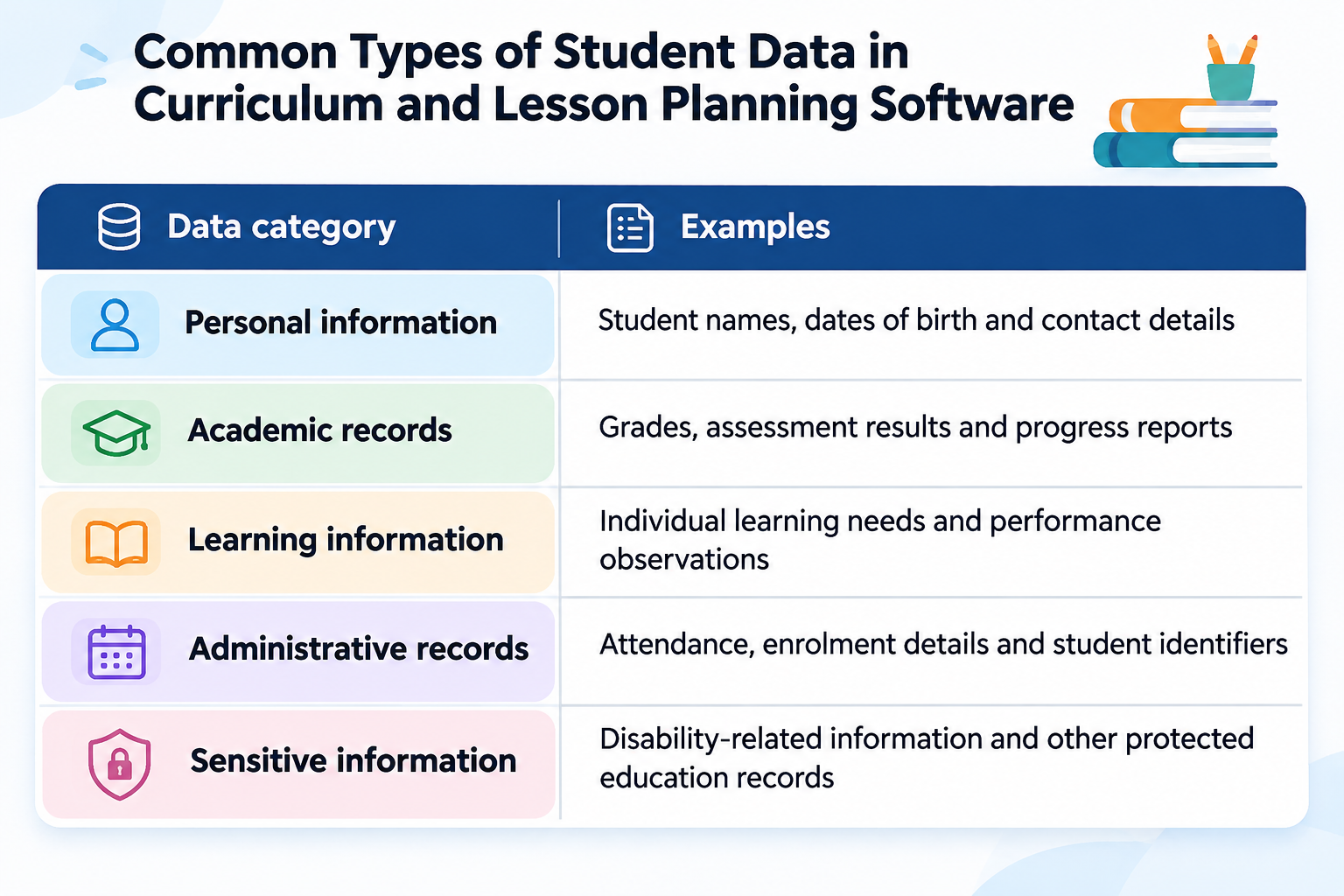
Not every curriculum management platform collects all these categories. Some focus entirely on curriculum documentation and instructional planning. Others offer integrations or features that involve student-level information. Schools should identify exactly what their chosen software collects and whether that information is necessary for its intended educational purpose. For example, teachers may need grade-level learning objectives in a shared curriculum map. But they may not need individual student names or assessment records in the same document.
How Can K-12 Schools Protect Student Data in Curriculum Management Software?
Student data protection requires a combination of appropriate technology, clear policies and responsible user practices. Schools should evaluate the following safeguards when selecting and implementing curriculum management and lesson planning software.
Limit the collection of student information
Data minimisation means collecting and retaining only the information needed for a specific purpose. It is an important starting point for protecting student privacy. Curriculum leaders may need access to academic standards, curriculum maps, assessment frameworks and instructional resources. They do not necessarily need individual student records to review curriculum coverage or coordinate lesson planning.
Schools should keep curriculum documentation separate from student-specific information wherever possible. This reduces unnecessary data exposure and makes it easier to manage access across departments.
Control access through user permissions
Teachers, curriculum directors, administrators and IT teams have different responsibilities. They should not automatically have access to the same information. Role-based access control (RBAC) allows schools to assign permissions according to each user's responsibilities.
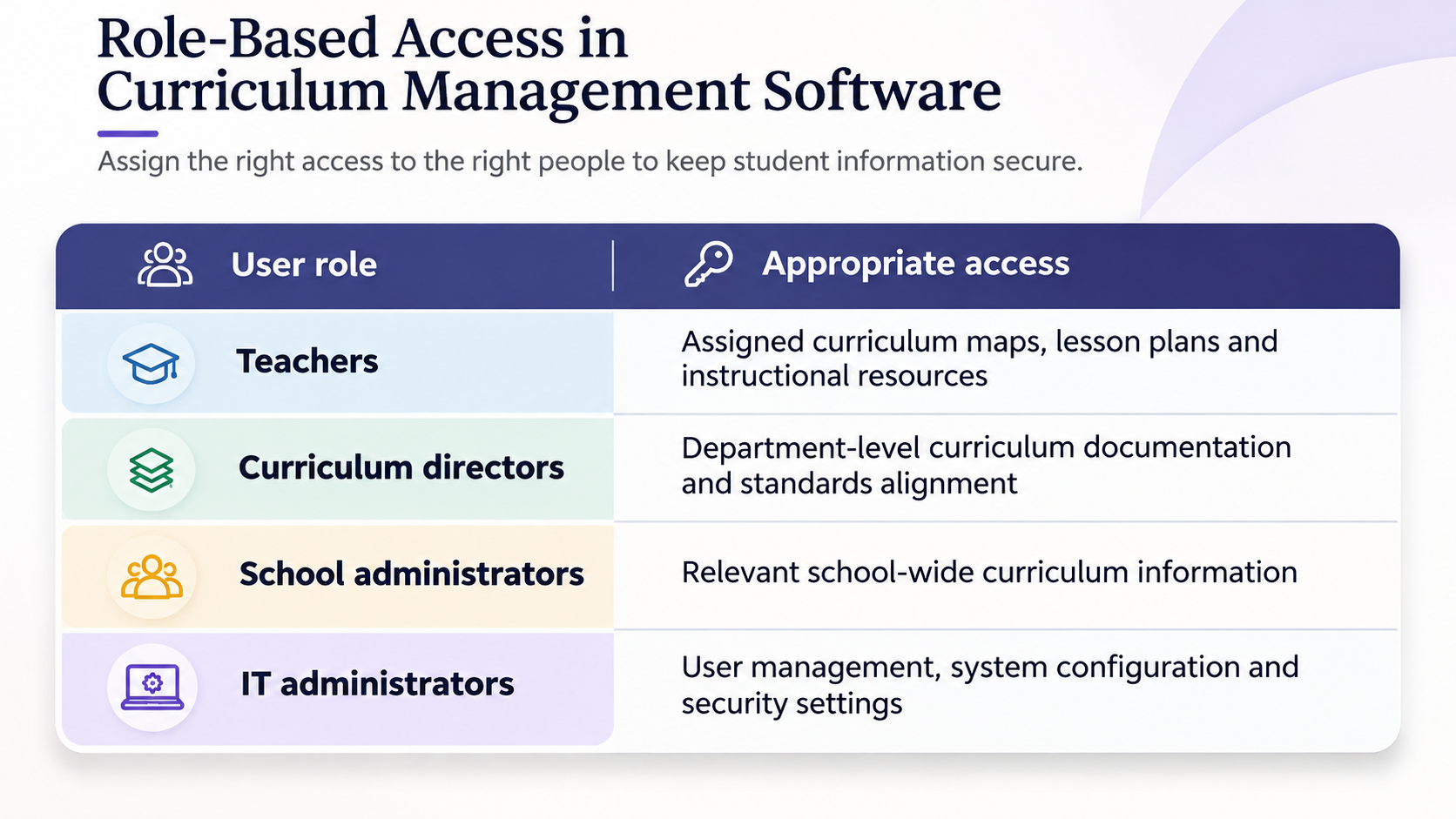
Schools should review these permissions regularly. When a teacher changes roles or leaves the institution, their previous access should be updated or revoked.
3. Evaluate encryption and authentication
Schools should ask software providers how they protect information from unauthorized access. Encryption and authentication are two important areas to examine. Encryption helps protect information during transmission and storage. Multi-factor authentication (MFA) adds another verification step during login, making unauthorized account access more difficult. Other safeguards worth reviewing include audit logs, secure cloud infrastructure, regular security assessments and reliable backup procedures. Schools should also understand how providers identify vulnerabilities and respond to security incidents.
No single security feature guarantees complete protection. The provider's overall security practices and the school's own configuration both matter.
4. Review third-party integrations
Curriculum management platforms may connect with student information systems, learning management systems, assessment tools and other educational applications. These integrations can reduce manual work. But they may also create additional data-sharing risks. Schools should understand what information moves between connected systems, why it is shared and who can access it. They should also check whether integrations can be restricted or disabled when they are no longer needed.
Before enabling an integration, administrators should review its purpose, permissions and data handling arrangements. This helps prevent unnecessary access to student information across the school's technology environment.
5. Establish data retention and deletion policies
Student data protection does not end when information is securely stored. Schools must also know how long it remains in a platform and what happens when it is no longer required. Data retention policies should define how long information is kept and when it must be deleted. Schools should also understand how providers handle backups, data exports and information remaining after a contract ends. This becomes particularly important when moving from one curriculum management platform to another.
Schools may need to transfer curriculum maps, standards alignment records and instructional resources while ensuring that unnecessary personal information is not retained. Data portability and secure deletion should both be addressed in the provider agreement.
6. Examine vendor privacy policies and agreements
Schools should not assume that every educational software provider follows the same data privacy practices. A review of the provider's privacy policy and contractual terms should be part of the procurement process. School leaders should ask what information the provider collects, whether it shares data with subcontractors and whether student information is used for advertising or unrelated commercial purposes. They should also examine how the provider reports security incidents and handles information when a school ends its subscription.
Written agreements should define data ownership, permitted use, confidentiality, retention and deletion responsibilities. They should also establish the school's control over education records where FERPA applies.
7. Train teachers and school staff
Even well-designed security controls cannot prevent every privacy risk. Teachers and administrators need to understand how their everyday actions affect student data protection. Schools should provide regular training on approved educational software, account security, document sharing and responsible data handling. Staff should avoid adding unnecessary student details to shared curriculum documents and should never share login credentials. They should also know how to report suspicious activity and where to seek approval before using new applications. These practices help make data privacy part of everyday school operations.
What Do FERPA and COPPA Require of K-12 Schools and EdTech Providers?
Schools in the United States must consider the federal and state privacy requirements that apply to their use of educational technology. Two important federal laws are the Family Educational Rights and Privacy Act (FERPA) and the Children's Online Privacy Protection Act (COPPA).
FERPA: Protecting Student Education Records
FERPA protects the privacy of student education records at covered educational institutions. It gives parents certain rights to access and review their children's education records. These rights generally transfer to students when they turn 18 or attend a postsecondary institution. FERPA becomes relevant when curriculum or lesson planning software receives personally identifiable information (PII) from protected education records.
Under the school official exception, a school may disclose certain information to an external provider without obtaining prior parental consent, provided the applicable conditions are met. The provider must perform an institutional service, remain under the school's direct control regarding the use and maintenance of education records and follow restrictions on the use and redisclosure of the information. The provider must also meet the school's criteria for a school official with a legitimate educational interest.
Schools should, therefore, review a provider's role and data handling practices before sharing protected education records.
COPPA: Protecting Children's Online Privacy
COPPA applies to operators of certain online services that collect personal information from children under 13. It is particularly relevant when students use educational websites, applications or other online services directly. In certain school-authorised educational contexts, a school may provide consent on behalf of parents when an operator collects children's information solely for the use and benefit of the school. This authority is limited to the educational context. It does not permit unrelated commercial use of the information. The provider must also meet its own COPPA obligations, including providing the required notice of its data collection, use and disclosure practices. Schools should review these practices before approving a service for classroom use.
FERPA and COPPA address different aspects of student privacy. Schools should also check applicable state student privacy laws and other requirements before adopting educational software.
How Can Schools Protect Student Data When Using AI for Lesson Planning?
AI tools can help teachers generate lesson ideas, develop assessment questions, organise learning objectives and adapt instructional resources. These applications can support lesson planning, but they also introduce new data privacy considerations.
Schools should establish clear guidelines for using AI-powered educational tools. Teachers should avoid entering identifiable student information into unapproved applications. They should understand whether an AI provider retains submitted information or uses it to improve its models. Schools should also distinguish between general AI-assisted lesson planning and tools that process individual student records. Generating a lesson outline from a grade-level learning objective presents different privacy considerations from uploading identifiable assessment records for personalised recommendations.
Any AI-generated instructional content should be reviewed by teachers before use. Schools should also check provider policies, access settings and applicable privacy requirements before approving AI tools for educational use.
What Should Schools Check Before Choosing Curriculum Management Software?
A software evaluation should consider more than features, usability and pricing. School leaders should understand how a curriculum management platform collects information, manages permissions and supports responsible data practices. The following checklist can help curriculum leaders, administrators and IT teams evaluate potential platforms.
Student Data Protection Checklist for K-12 Schools
Schools should involve curriculum leaders, IT administrators and school leadership in this review. They should also revisit their assessment when adding integrations, introducing new features or changing software providers.
How Does Secure Curriculum Management Support Better Teaching?
Effective curriculum management depends on organised documentation and collaboration. Teachers need reliable tools to plan lessons, align academic standards and share instructional resources. Curriculum leaders need visibility across departments to review coverage and identify gaps. These activities do not always require access to individual student records. A structured curriculum management approach allows schools to organise instructional information while keeping student-specific records within appropriate systems.
When evaluating curriculum management software, schools should therefore look beyond functionality. They should consider how the platform supports collaboration, manages access and fits into the school's wider data privacy practices.
The aim is to give educators the tools they need to plan and collaborate effectively while respecting student privacy.
Frequently Asked Questions
1. Does curriculum mapping software store student data?
Not necessarily. Many curriculum mapping platforms focus on academic standards, curriculum maps, learning objectives and instructional resources. However, some platforms may process student information through specific features or integrations. Schools should review the provider's data collection and sharing practices before adoption.
2. Is lesson planning software required to comply with FERPA?
FERPA does not automatically apply to every lesson planning application. Its requirements depend on the information involved and how the school and provider use it. If a provider accesses personally identifiable information from protected education records, the relevant FERPA requirements must be considered.
3. How can schools prevent unauthorized access to student records?
Schools can use role-based permissions, strong authentication, multi-factor authentication and regular access reviews. They should also train staff to follow secure data handling practices and use only approved educational applications.
4. What should schools check before sharing student data with EdTech providers?
Schools should review the provider's privacy policy, data collection practices, security measures and third-party sharing arrangements. Written agreements should also cover permitted data use, confidentiality, retention, deletion and the provider's responsibilities.
5. Can teachers use AI for lesson planning without exposing student information?
Yes. Teachers can use AI to generate lesson ideas, develop instructional resources and organise learning objectives without sharing identifiable student information. Schools should establish guidelines for approved AI tools and review their data handling practices.
6. What is the difference between curriculum management software and a student information system?
Curriculum management software helps schools organise curriculum maps, academic standards, learning objectives and instructional planning. A student information system manages individual records, such as enrollment, attendance and grades. Some educational platforms integrate with both types of systems, so schools should understand what information is shared through these connections.
Strengthen curriculum planning while safeguarding student data
Effective curriculum management depends on more than organising learning objectives and instructional resources. Schools also need clear processes for handling information, controlling access and protecting student privacy. When these practices are built into technology decisions, educators can collaborate more confidently while keeping sensitive information appropriately protected.
For school leaders, this starts with asking the right questions before adopting new software. What information does the platform collect? Who can access it? How is data protected? Are its integrations and retention policies clearly documented? These questions should guide every technology evaluation, alongside the platform's ability to support curriculum alignment and instructional planning.
Edusfere helps K-12 schools bring curriculum mapping, academic alignment and instructional planning into a more structured environment. By organising curriculum documentation and supporting collaboration, it gives educators better visibility into their curriculum planning processes.
Explore Edusfere to learn how a structured approach to curriculum management can support more effective teaching and learning.