

Inside this Blog:
- Why Schools are moving beyond Spreadsheets for Curriculum Management
- Why Spreadsheets No Longer Work for Curriculum Management
- What is Curriculum Mapping Software (and why it matters in 2026)?
- Key Features to look for in a Modern Curriculum Mapping Software
- ROI of Curriculum Mapping Software vs. Manual Systems
- Why Curriculum Mapping Deserves a Digital Upgrade in 2026
- The Future of Curriculum Management: From Reactive to Proactive
- Frequently Asked Questions about Curriculum Mapping Software
- Ready to move beyond spreadsheets?
Why Schools are moving beyond Spreadsheets for Curriculum Management
In 2026, schools are under growing pressure to stay agile and data-driven. However, many K-12 districts still rely on spreadsheets for curriculum mapping, tools that were never built for modern collaboration or standards alignment.
As curriculum complexity grows, these static systems create more challenges than clarity. For superintendents, curriculum directors and edtech leaders, the shift to digital curriculum management isn’t optional anymore — it’s strategic.
In a world where digital transformation is sweeping through every sector, it's surprising how many schools still rely on static spreadsheets and documents for curriculum management.
These traditional methods may feel familiar. But they no longer meet the complex demands of modern-day teaching. For tech coordinators, superintendents and curriculum directors, it’s time to enable the move beyond spreadsheets. Especially with the back-to-school season on the horizon.
Choosing the right lesson planning and curriculum mapping software requires more than comparing features. Schools need a platform that connects classroom instruction with curriculum goals, supports standards alignment and gives academic leaders visibility across grades and departments.
In this guide, we compare six curriculum and instructional planning platforms, examine the features that matter most to K-12 schools, and outline what to consider before making a decision in 2026.
Why Spreadsheets No Longer Work for Curriculum Management
Traditional spreadsheets and static PDFs were once useful for lesson tracking and pacing guides. But in today’s education landscape, they’ve become barriers to effective curriculum design.
According to the EdWeek Research Center, over 70% of curriculum leaders struggle to ensure alignment across grades using spreadsheets or manual tools. Here’s why:
- Lack of Real-Time Collaboration
Curriculum planning requires teamwork. Teachers, coaches and administrators need to collaborate live; not juggle outdated versions in email threads.
- Manual Updates lead to Manual Errors
Every copy-paste or outdated cell can create inconsistencies that ripple across grade levels. Automation reduces these risks dramatically.
- No Visual or Data Insights
Spreadsheets can’t display gaps or redundancies. A visual curriculum mapping tool shows where standards overlap or fall short.
- No Audit Trails for Accreditation
When auditors ask for curriculum documentation, static files don’t show change history or compliance status — adding stress during accreditation cycles.
Read more: How are Teachers using Curriculum Mapping to Design more Effective Lessons?
What is Curriculum Mapping Software (and Why it Matters in 2026)?
Curriculum mapping software is a digital platform that helps schools organize, align and manage instructional content across grades, subjects and departments. It provides a shared space for curriculum maps, learning objectives, standards, assessments and instructional resources. When combined with lesson planning capabilities, it connects school-wide curriculum goals with everyday classroom instruction. Teachers can develop and organize lesson plans, while curriculum directors and administrators gain visibility into standards coverage, instructional progress and curriculum gaps.
Modern platforms may also include AI-assisted documentation, collaboration tools, reporting and integrations with other school systems. The right solution depends on how well these capabilities support a school's existing teaching and curriculum management processes.
Key Features to look for in a Modern Curriculum Mapping Software
Modern curriculum mapping software is purpose-built to solve these problems. If your school is evaluating solutions for back-to-school 2026, here are the must-have features to prioritize:
- Standards-aligned Teacher Lesson Plans
Top curriculum mapping platforms automatically embed Common Core, NGSS and state-specific standards, ensuring every teacher lesson plan is compliant and consistent.
- Visual Curriculum Maps
Forget cells and tabs. Replace static grids with interactive visual maps that make gaps and redundancies visible across subjects and grades.
- Integrated Teacher Lesson Plan
Modern curriculum mapping software allows teachers to upload or create lesson plans directly within the platform- aligned, searchable and shareable. This ensures every instructional minute is intentional and standards-aligned.
- Real-time Collaboration
Collaborate like Google Docs, but with role-based permissions. Teachers and administrators can comment, edit and refine plans together.
- Version Control and Audit Logs
Automatic version tracking ensures transparency; essential for accreditation reviews like WASC or Cognia.
- LMS and SIS Integration
Connect with Google Classroom, Canvas, or PowerSchool to unify your curriculum, instruction and assessment workflows.
AI-Assisted Curriculum Planning and Documentation
AI is becoming a useful addition to curriculum mapping and lesson planning software. Depending on the platform, educators can use AI to organize lesson documentation, develop unit maps, refine learning objectives and identify potential standards alignment gaps.
However, AI capabilities vary considerably. Schools should look for tools that support teacher expertise and reduce repetitive work, while keeping educators in control of instructional decisions.
The latest platforms leverage AI to recommend instructional strategies, highlight pacing mismatches and even forecast student performance trends.
Best Curriculum Mapping Software for Schools (2026)
Not all curriculum mapping platforms solve the same problems. Some focus on curriculum documentation and standards alignment, while others specialize in lesson planning, assessment or instructional scheduling.
The following comparison examines six platforms across key evaluation criteria to help K-12 schools identify which solution best matches their requirements.
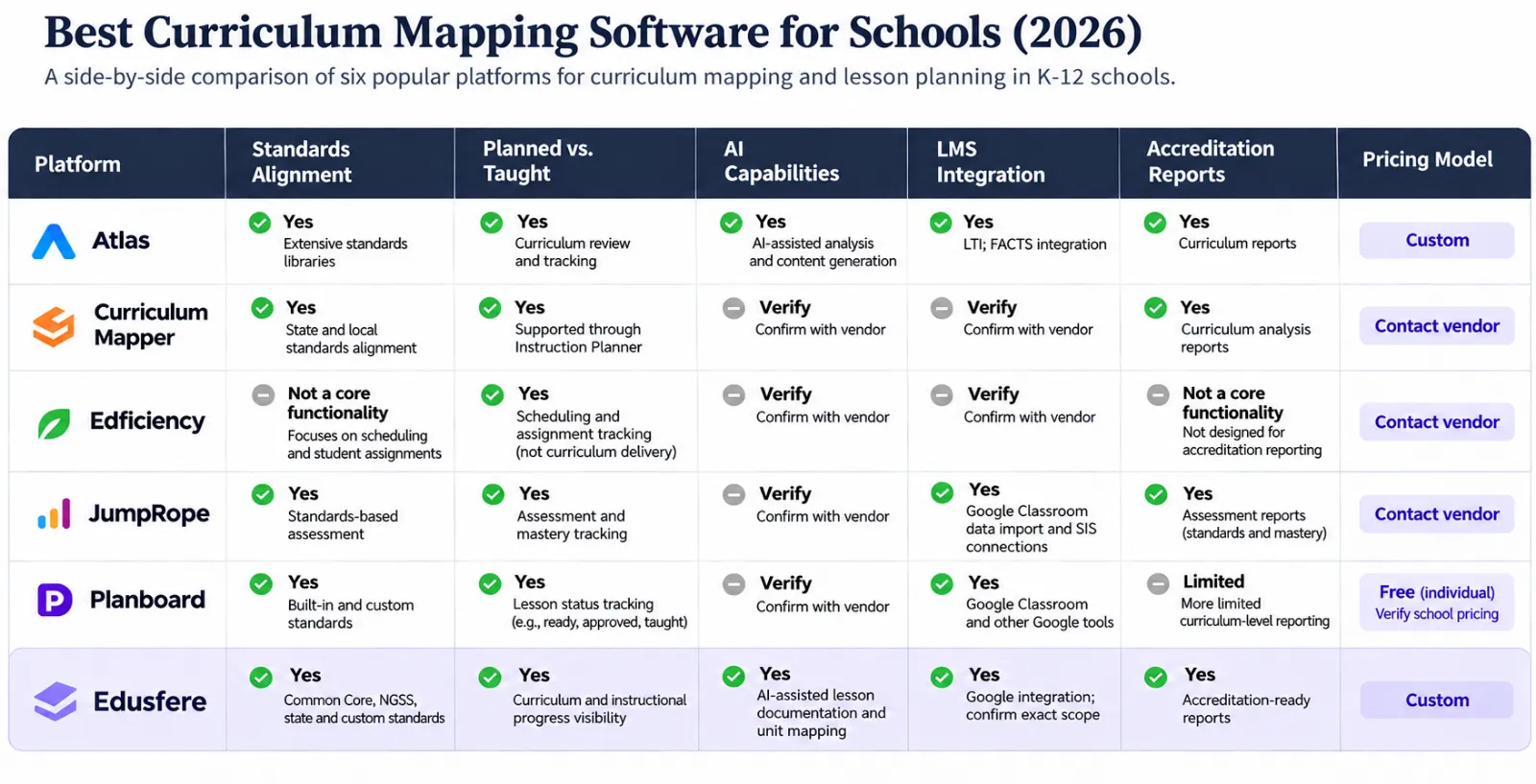
(Editorial note: Verify all vendor-specific features and current pricing before publication.)
Which Curriculum Mapping Software Is Right for Your School?
The best curriculum mapping software depends on who will use it and what your school wants to improve.
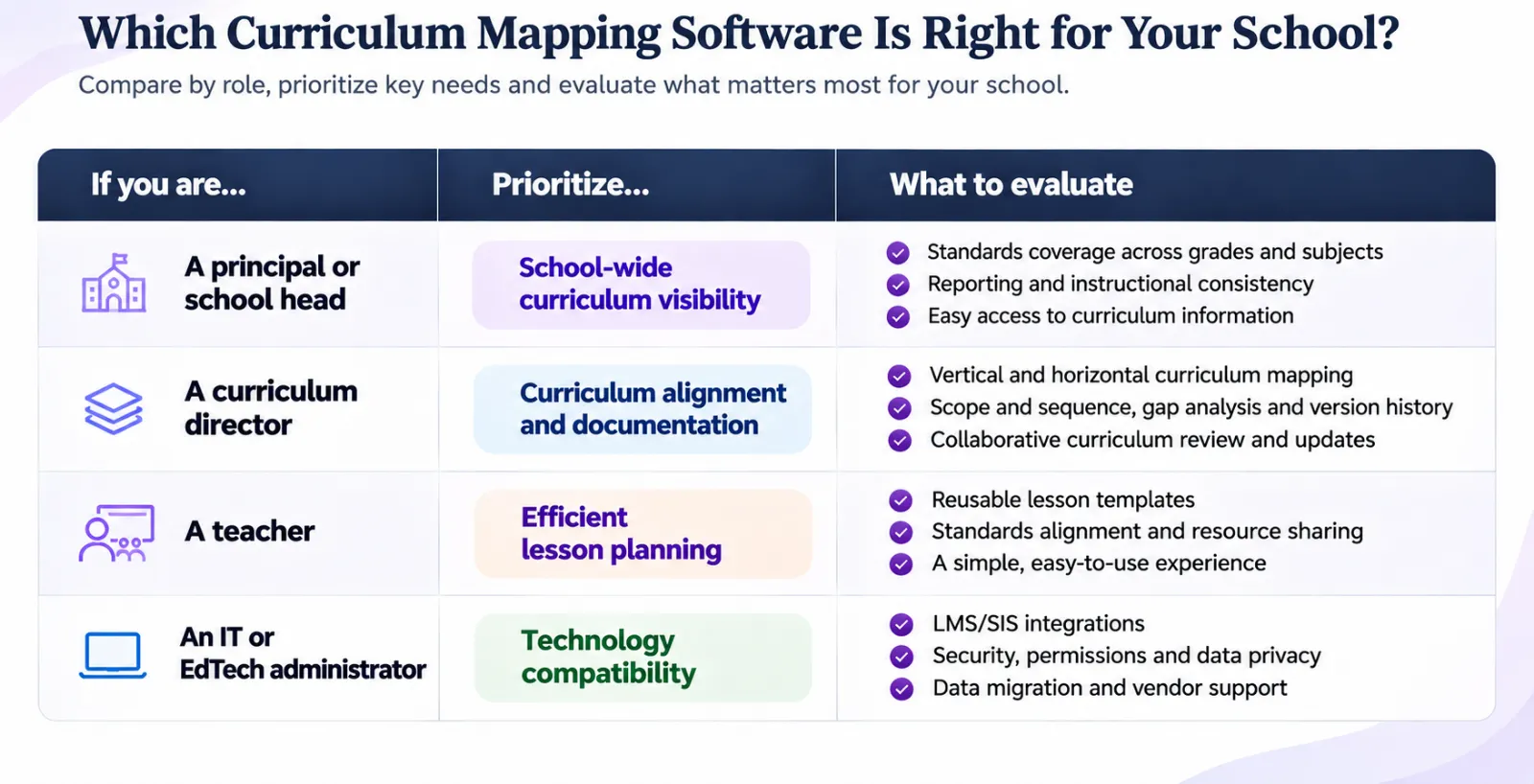
Before selecting a platform, involve representatives from each group in the evaluation. A successful implementation should work for teachers while giving administrators the information they need to support curriculum improvement.
ROI of Curriculum Mapping Software vs. Manual Systems
The value of curriculum mapping software extends beyond reducing administrative work. It helps schools organize instructional knowledge, improve curriculum visibility and make planning more consistent across grades and departments. The return on investment can be evaluated through four areas, viz., time saved, curriculum alignment, collaboration and accreditation preparation.
Let’s break it down into four key areas: time saved, alignment improved, collaboration enhanced and outcomes elevated.
- Efficient Time Management
Schools that transition to dedicated curriculum mapping software report saving 10 to 15 hours per teacher for each semester. That’s time that can be reinvested in instructional planning, professional development or direct student support.
- Better Curriculum Alignment
Schools using modern tools show up to 30% better alignment across subjects and grade levels. This means fewer instructional gaps, improved coherence and more equitable learning opportunities.
- Accreditation Made Easier
Whether it’s Cognia, WASC or your state’s accreditation board, curriculum documentation is a cornerstone of success. Software platforms automatically generate reports on standards coverage, assessment types and pacing, saving weeks of manual prep.
- Cost Justified by Quality Outcomes
When teachers spend less time wrestling with spreadsheets, they can focus on what really matters, i.e., teaching. Improved lesson quality and consistency across the district lead to better student outcomes, stronger test scores and more engaged classrooms.
Beyond ROI, the biggest win is instructional quality by enabling teachers to spend more time teaching and less time formatting spreadsheets.
How to Implement Curriculum Mapping Software: A 30/60/90-Day Plan
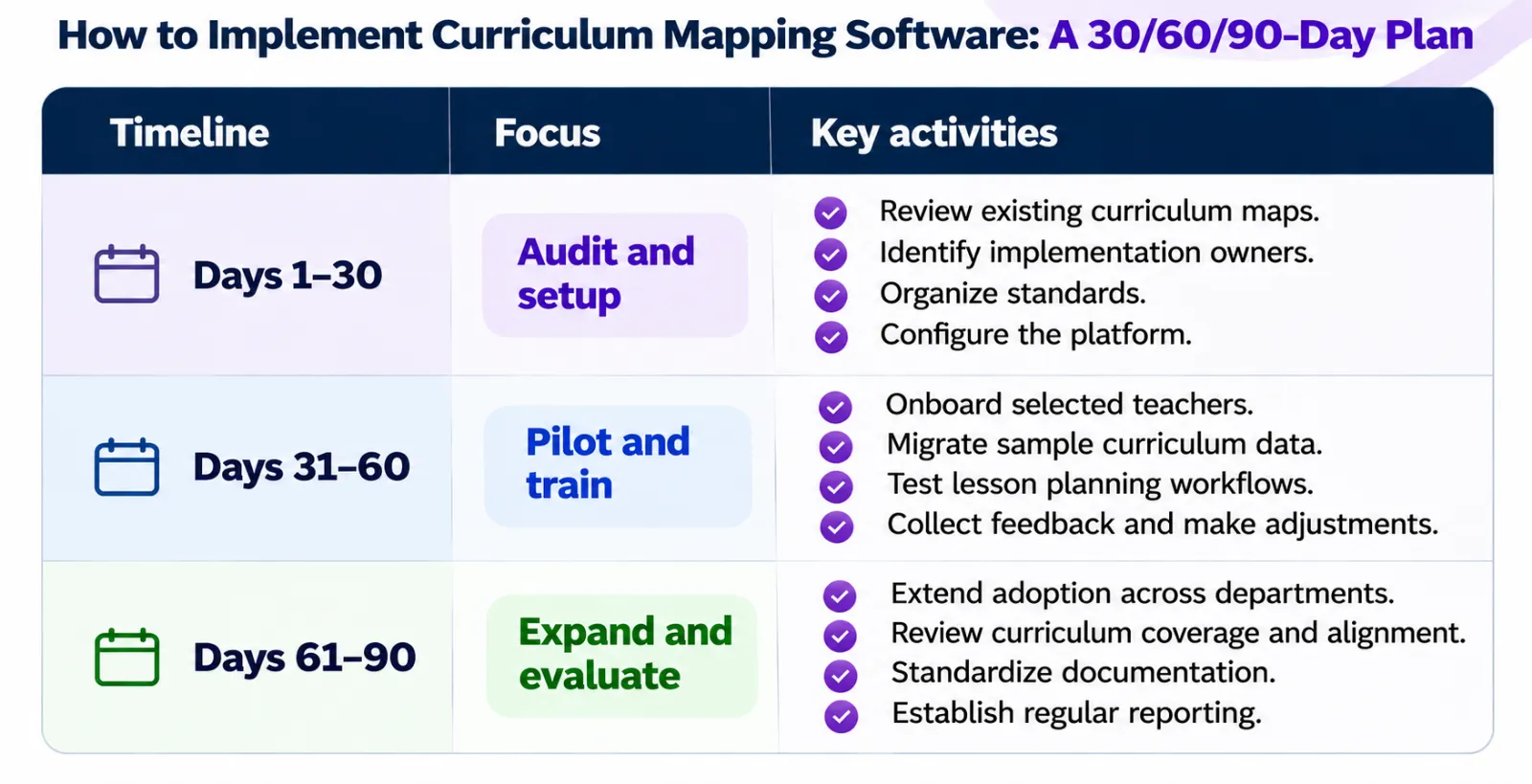
Choosing a platform is only the first step. Schools also need a structured implementation plan to ensure teachers adopt the software and curriculum information remains accurate.
A phased rollout can help schools transition from spreadsheets and disconnected documents without disrupting classroom instruction.
What Should Schools Measure After Implementation?
- Teacher adoption and platform usage
- Percentage of curriculum maps documented
- Standards coverage across grades and subjects
- Time spent on curriculum documentation
- Completeness of curriculum records for accreditation reviews.
Implementation does not end after 90 days. Schools should establish regular curriculum review cycles to keep instructional plans relevant and aligned with changing academic priorities.
Why Curriculum Mapping Deserves a Digital Upgrade in 2026
Dr. Heidi Hayes Jacobs, a leading expert in Curriculum Design, has long emphasized that “curriculum must be viewed as a living document,” not something filed away in drawers.
From a technical standpoint, spreadsheets also fall short on accessibility and usability. A study by the Consortium for School Networking (CoSN) in 2022 revealed that 45% of edtech leaders cite user frustration with manual tools as a top barrier to curriculum innovation.
A digital curriculum management platform gives schools more than an organized place to store lesson plans. It creates a shared record of instructional decisions, standards alignment and curriculum development.
For schools managing multiple grades, departments or campuses, this visibility supports better collaboration and more consistent curriculum review.
Read more: The Ultimate Curriculum Mapping Checklist For U.S. K-12 Schools In 2025
The Future of Curriculum Management: From Reactive to Proactive
Curriculum management is moving beyond static documentation towards connected, continuously updated instructional planning.
AI-assisted tools can help educators organize lesson documentation, develop curriculum maps and review standards alignment. Shared workspaces also make it easier for teachers and curriculum leaders to collaborate and maintain consistent instructional records.
The next step is not simply digitizing existing curriculum documents. It is creating a system where curriculum knowledge remains accessible, useful and adaptable as school needs evolve.
Frequently Asked Questions about Curriculum Mapping Software
1. What is the best curriculum mapping software for schools in 2026?
The best curriculum mapping software depends on a school's size, instructional priorities and reporting requirements. Atlas is suited to comprehensive curriculum planning and analysis, Curriculum Mapper focuses on curriculum documentation, and Planboard supports everyday lesson planning. Edusfere brings curriculum mapping, lesson planning, standards alignment and collaborative documentation into one platform.
2. What is the difference between curriculum mapping and lesson planning software?
Lesson planning software helps teachers organize daily instruction, activities, resources and learning objectives. Curriculum mapping software provides a broader view of what is taught across grades and subjects, helping schools maintain standards alignment and identify curriculum gaps. Platforms that combine both capabilities connect classroom instruction with school-wide academic goals.
3. Can curriculum mapping software track planned vs. taught curriculum?
Some curriculum mapping platforms offer tools to compare planned curriculum with instructional progress. Teachers can document completed lessons, changes in pacing and instructional adjustments. This helps curriculum directors identify gaps between intended curriculum and classroom implementation.
4. Does curriculum mapping software integrate with an LMS?
Integration capabilities vary by platform. Some solutions support Google Classroom, while others offer LTI connections or integrations with specific learning management systems. Schools should confirm compatibility with their existing LMS and student information system (SIS) before selecting a platform.
5. Can curriculum mapping software support school accreditation?
Yes. Curriculum mapping software can help schools organize curriculum documentation, demonstrate standards alignment and review instructional coverage. These records can support accreditation preparation by making relevant curriculum evidence easier to access and maintain. However, software alone does not guarantee accreditation compliance.
6. How much does curriculum mapping software cost?
Pricing depends on the platform, school size, number of users and required features. Some tools offer free individual teacher plans, while others use school-wide or district-level subscriptions and customized institutional pricing. Schools should also consider implementation, training, integrations and ongoing support when comparing costs.
Ready to move beyond spreadsheets?
Moving beyond spreadsheets is about creating a more connected approach to curriculum planning.
Edusfere brings curriculum mapping, lesson planning, standards alignment and instructional documentation into one workspace. Teachers can organize their plans and resources, while school leaders gain better visibility into curriculum coverage and institutional knowledge.
Explore how Edusfere can help your school simplify curriculum management and strengthen instructional planning.