
Key Takeaways
- 40-50% of teachers introduce new material yearly, making curriculum mapping non-optional.
- Curriculum mapping is the shared source of truth beneath courses, units and lessons.
- Cascading updates kill manual re-entry when standards or pacing change.
- Lesson planning isn't separate from curriculum management; Smart Assist inherits context from the curriculum map.
- AI cannot out-teach the person in the room.
Curriculum management means different things depending on who's asking. For a curriculum director, it's about keeping standards alignment visible across grade levels. For a principal, it's about knowing whether classroom instruction actually reflects what was approved. For a teacher, it's about not having to re-map the same unit every time a standard shifts.
The stakes are real. Research from Hanover Research finds that 40 to 50% of K-12 teachers introduce new instructional material each year. This is what makes consistent curriculum alignment and implementation essential for any school or district trying to protect student outcomes. Without a system to manage that turnover, curriculum maps go stale the moment a teacher swaps a resource or adjusts pacing.
Time is the other constraint. A typical K-12 teacher works roughly 52 hours a week, according to NCES data. And much of that time is consumed by planning that happens in isolation rather than in coordination with grade-level or department teams. Curriculum management software exists to close that gap – to keep mapping, alignment and lesson planning connected without adding to a teacher's workload.
Edusfere is built around this connection. Here's how each core feature of its curriculum mapping software works and how it ties back to lesson planning at the classroom level.
1. Curriculum Mapping
Curriculum maps in Edusfere sit above the course level, showing how units and standards connect across a subject and grade band. Courses, units and lessons all reference the same underlying map, so a curriculum director can see coverage at a glance without pulling reports from individual teachers.
Because the map is the shared source of truth, a change to a unit's placement or a standard's grade-level assignment is visible immediately to everyone working underneath it! not just the person who made the edit. This matters because curriculum alignment isn't just a compliance exercise. Research examining alignment and student achievement found that classrooms with stronger alignment between planned and enacted curriculum saw meaningfully higher achievement correlations than classrooms where alignment was weak. This underscores why the connection between mapping and actual classroom instruction deserves more attention than a static document can provide.
What this replaces: Static curriculum maps in spreadsheets or shared drives, which drift out of sync with what's actually being taught the moment a teacher adjusts pacing or swaps an activity.
Benefit: No more chasing down five different spreadsheet versions to find out what's actually being taught. One map, always current, visible to everyone who needs it.
2. Vertical and Horizontal Alignment
Alignment in Edusfere's curriculum management system works in two directions. Vertical alignment, tracking how a standard or skill progresses from one grade to the next, so a 4th grade math team can see exactly what 3rd grade already covered and what 5th grade expects. Horizontal alignment, tracking consistency across sections or teachers at the same grade level, so two 7th grade ELA classes are working from comparable pacing and objectives even with different teachers.
Both views pull from the same lesson and unit data teachers are already entering through their lesson planning workflow. Alignment isn't a separate audit process bolted on afterward.
Benefit: Catches gaps and overlaps before they hit students, not after test scores reveal them.
3. Cascading Curriculum Updates
Standards change. Units get retired. Pacing guides shift. Each of those changes needs to reach every affected course, without a curriculum director manually touching each one.
Edusfere cascades updates from the curriculum level down through courses and units. The map stays current. Teachers see the update in context, not as a separate memo to track. This is where centralized curriculum management earns its keep. The alternative, however, is a curriculum director emails a document and hopes every teacher updates their own copy. That's exactly the kind of drift that leaves curriculum maps disconnected from the classroom.
Benefit: One update, applied everywhere it's needed. No memo gets missed, no teacher works from an outdated version.
4. Instructional Calendars
Most pacing guides run on a generic week-by-week template. They don't know about testing blocks, holidays or early releases.
Edusfere ties pacing to an instructional calendar instead. Units and lessons get scheduled against actual school days. School leaders get a real-time view of whether pacing is on track. Teachers get a calendar built around their building's real schedule, not a theoretical one.
Benefit: Pacing conversations stop being guesswork. Everyone's looking at the same real calendar, not a template that assumes a perfect school year.
5. AI Smart Assist
Writing out every prep step, instructional step, and objective tag for a new activity takes time most teachers don't have. Smart Assist shortens that process.
A teacher describes an activity in three words or two paragraphs, either works. Smart Assist combines that description with the course, unit, and lesson context already in Edusfere to infer prep steps, instructional steps and objective tags. The teacher reviews everything, edits what needs changing and keeps full control of the final plan. Smart Assist fills in implementation detail; it never decides what gets taught. That distinction is the whole point; the tool speeds up the writing, not the thinking.
Benefit: Cuts the time spent writing out prep steps and objective tags from scratch without handing over the instructional decision.
6. Lesson Importer
Most teachers already have lesson plans sitting in old documents, folders or last year's files. Those plans are usually good; they're just disconnected from everything else in the system.
Lesson Importer takes an existing plan, pasted or uploaded and places it into the right course and unit context, writing out activities, objectives and details automatically. It doesn't rewrite the teacher's plan or change what's being taught. It reads what's already there and structures it to match the rest of the curriculum map.
Nothing gets rebuilt from scratch. The plan a teacher already trusts gets connected to the curriculum map instead of sitting outside it; which also means it becomes visible to a curriculum director doing an alignment check, instead of living only on one teacher's laptop.
Benefit: Years of existing lesson plans become part of the live curriculum map instead of getting lost in a folder no one else can see.
How This Connects to Lesson Planning
Curriculum management in Edusfere isn't separate from day-to-day lesson planning. It's the structure lesson planning that sits inside. When a teacher builds a lesson with tools like Smart Assist, that lesson is automatically placed in the context of its course, unit and the broader curriculum map. The teacher still decides what to teach and how; Edusfere keeps that decision connected to the standards and pacing it's supposed to align with. That connection matters more than it might seem.
When teachers plan in isolation without visibility into what colleagues are covering, the kind of instructional drift that weakens alignment becomes much harder to catch. Curriculum management software that links mapping directly to lesson planning closes that gap by design, not by asking teachers to do extra reporting.
Teachers decide. AI captures. Nothing walks out the door.
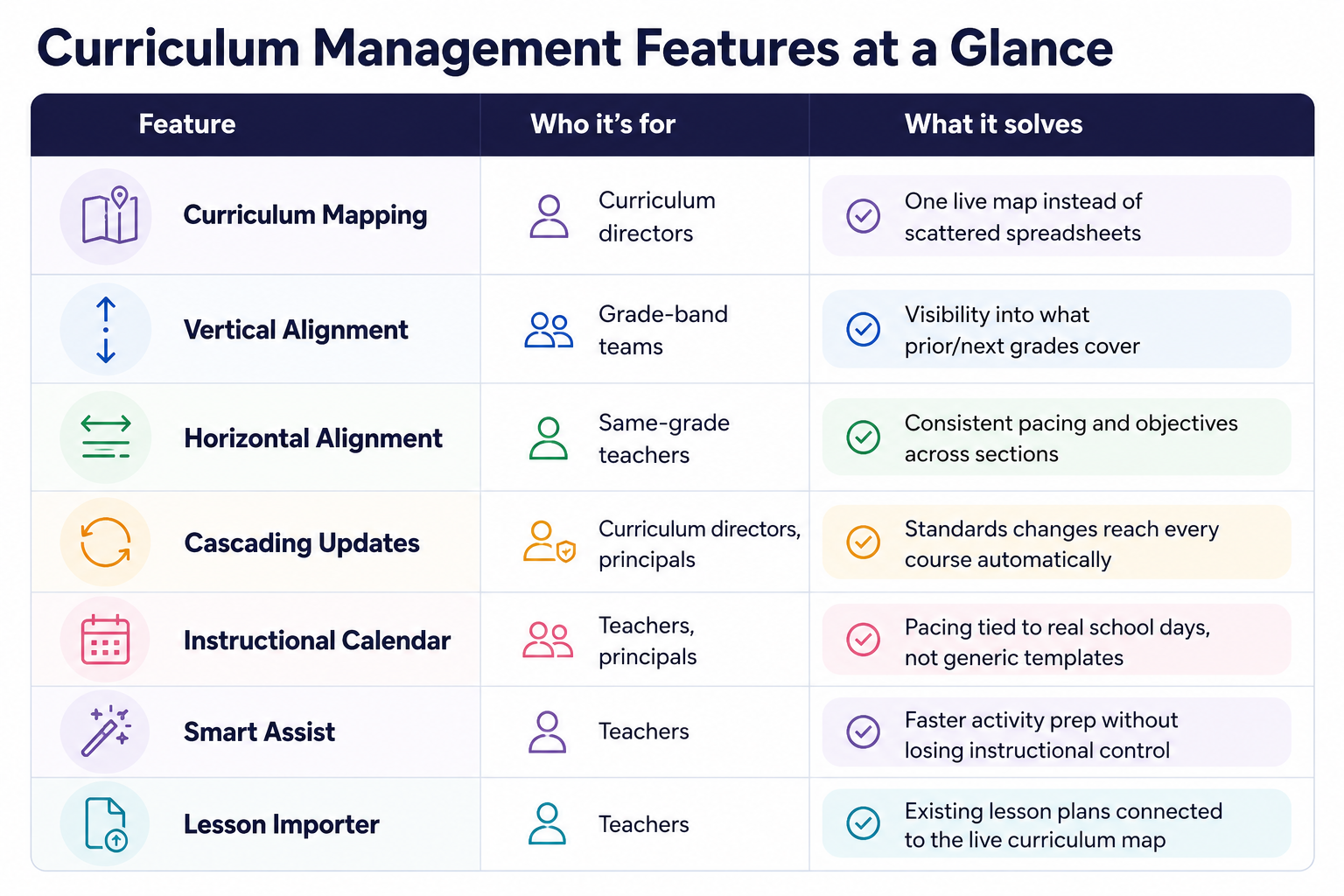
Curriculum Management Features at a Glance
Frequently Asked Questions (FAQs)
Does Edusfere replace a district's existing curriculum framework?
No. Edusfere's curriculum management system connects and maintains the curriculum a district has already adopted; it doesn't dictate standards or content.
Can teachers see how their lessons connect to the broader curriculum map?
Yes. Because lesson planning happens inside the course/unit structure, teachers see the standards and pacing context directly, without needing a separate report.
How is this different from a static curriculum map in a shared drive?
A shared-drive map is a snapshot that goes stale. Edusfere's curriculum mapping software is live and updates cascade to every connected course automatically and alignment views reflect current lesson planning data, not last year's plan.
Does AI decide how curriculum updates get applied?
No. Cascading updates move data the curriculum director or administrator has approved. Edusfere doesn't use AI to make instructional or curricular decisions.
See Edusfere's Curriculum Management Tools in Action
Explore how curriculum mapping, standard alignment and cascading updates work together in a live district environment.