

Key Takeaways
- AI tools can save teachers significant planning time
- The best tools support teaching, not replace teachers
- Different platforms solve different needs: planning, design, collaboration or curriculum oversight
- Schools need strategy, governance and training for successful adoption
- Edusfere is best suited for curriculum mapping and school-wide curriculum management
Teachers are being asked to do more than ever – plan engaging lessons, personalise learning, track progress, align standards, create assessments, collaborate with teams and manage increasingly diverse classrooms. AI is now becoming a practical support system for that workload.
According to the OECD’s TALIS 2024 findings, around one in three teachers across participating education systems reported already using AI in their work. Among those teachers, common uses included generating lesson plans or classroom activities (64%) and learning or summarising a topic (68%).
This suggests AI is moving quickly from experimentation to everyday classroom support. At the same time, global education bodies such as UNESCO continue to emphasise that AI should support teachers, not replace them, with strong focus on ethics, safety and human judgement.
For schools looking to improve lesson planning, strengthen curriculum mapping, and modernise curriculum management, the right platform can create measurable impact. This blog explains the best AI tools for teachers, what each platform does best and how schools can choose the right fit.
What Are The Best AI Tools For Teachers?
Some tools are best for daily lesson planning, while others are stronger for curriculum mapping, school-wide planning, collaboration or instructional design. The best choice depends on whether your priority is saving teacher time, improving consistency, managing curriculum across grades or enhancing classroom resources.
Why AI Tools Matter for Lesson Planning
Lesson planning is one of the most valuable parts of teaching, but it is also one of the most time-consuming. Teachers often need to build objectives, learning activities, assessments, differentiation strategies and homework tasks every week. AI tools can reduce repetitive planning work while keeping teachers in control of instructional decisions. They can help educators:
- Generate lesson outlines aligned to learning outcomes
- Create differentiated activities for mixed-ability classrooms
- Build quizzes, rubrics and exit tickets quickly
- Adapt content for reading levels or multilingual learners
- Suggest projects, inquiry prompts and discussion questions
- Improve collaboration across teams
- Support long-term curriculum mapping
The real opportunity is not just speed. It is giving teachers more time for feedback, relationships and student learning.
What to Look for in AI Tools for Teachers
Before choosing any platform, schools should assess whether the tool solves real teaching and planning challenges.
Curriculum Alignment
Can the tool connect lesson planning to standards, competencies or institutional goals?
Differentiation Support
Can it help teachers create scaffolds, extensions, simplified content or varied pathways for different learners?
Ease of Use
Teachers need immediate value. If a tool is too complex, adoption often drops.
Privacy and Safety
For K-12 schools, student data protection and responsible AI use should be essential.
Collaboration and Curriculum Management
Can teachers and leaders work together, maintain consistency and improve curriculum management across the school?
Top AI Tools for Teachers: 6 Platforms to Know
1. Diffit
Diffit is designed to help teachers quickly adapt and personalise instructional materials for different learning levels. Instead of building multiple versions of the same content manually, teachers can generate differentiated resources in minutes. This is especially useful in K-12 classrooms where students often work at varied reading abilities and learning readiness levels.
Best For
Teachers who need differentiated instructional materials and reading-level support.
Hands-on Use Case
A teacher uploads an article or enters a topic and Diffit can generate:
- Simplified reading passages
- Vocabulary support
- Comprehension questions
- Student activities
- Multiple reading levels for the same topic
This helps teachers support mixed-ability classrooms more efficiently.
Why It Stands Out
It makes differentiated instruction faster and more manageable for everyday teaching.
2. Edusfere
Edusfere is designed for schools that need more than faster lesson creation. It combines lesson planning, curriculum mapping software and curriculum management in one connected platform.
Many schools do not struggle only with writing lessons. They also face broader challenges such as inconsistent planning, gaps in standards coverage, duplication across grades and limited visibility for academic leaders.
What sets Edusfere apart from the growing crowd of AI lesson planning tools is a foundational philosophy – the teacher is never handed a wheel they didn't ask for. Before the AI generates a single line of documentation, Edusfere's system does something most tools skip entirely; it listens. It begins by capturing rich contextual inputs including the teacher's profile, course information, unit structure, lesson goals and previous activity context. Only once that layered picture is in place does the AI step in, using all of that grounding to produce lesson documentation that actually reflects how a specific teacher thinks and what a specific group of students needs.
The result, as seen in their AI Smart Assist interface, is a generate-on-demand assistant that works within the teacher's framework rather than imposing one of its own. There are no generic lesson dumps or one-size-fits-all outputs; just a system that takes what the teacher already knows and preserves it at speed, turning a few words into structured descriptions, instructions and materials ready for review. It's AI as an amplifier, not an author.
And that distinction is exactly what makes Edusfere's approach feel trustworthy to educators who've been burned by tools that try to replace their judgment rather than sharpen it.
Best For
Schools, curriculum leaders, academic coordinators and teaching teams managing multiple grades or subjects.
Hands-on Use Case
With Edusfere, schools can:
- Map learning outcomes across grades and terms
- Track curriculum coverage across subjects
- Identify gaps or overlaps in delivery
- Align teacher plans with school goals
- Maintain consistency across classrooms
- Improve curriculum review cycles
Teachers still plan lessons but inside a shared academic system instead of isolated documents or spreadsheets.
Why It Stands Out
Many AI tools help with tomorrow’s lesson.
Edusfere helps schools improve the entire teaching framework.
3. ChatGPT
ChatGPT is one of the most flexible AI tools available to educators. It can support lesson planning, quiz generation, writing feedback, reading simplification, parent communication and cross-curricular brainstorming. Its biggest strength is adaptability.
Best For
Teachers who want broad AI support across many subjects and tasks.
Hands-On Use Case
Prompt: Create a Grade 7 maths lesson on ratios with differentiated tasks for beginner, on-level, and advanced learners.
The output may include objectives, examples, independent practice, extension tasks and formative checks.
Why It Stands Out
It can support dozens of teaching workflows beyond lesson planning.
4. Brisk Teaching
Brisk Teaching is an AI-powered teaching assistant designed to work directly inside educator workflows. Through browser integration, it helps teachers create lessons, quizzes, feedback, presentations and classroom materials without constantly switching platforms. Its focus on speed and workflow efficiency makes it particularly useful for busy teachers.
Best For
Teachers looking for fast classroom support integrated into daily teaching workflows.
Hands-on Use Case
Using Brisk, a teacher can:
- generate lesson resources from online content
- create quizzes and formative assessments
- draft student feedback
- adjust reading complexity
- build instructional materials directly from webpages or documents
Why It Stands Out
It reduces repetitive teacher tasks while fitting naturally into existing classroom workflows.
5. Microsoft Copilot
Microsoft Copilot embeds AI inside tools many schools already use, such as Word, PowerPoint, Excel and Teams. For schools already operating inside Microsoft ecosystems, this can reduce the need for extra platforms.
Best For
Schools that want AI inside existing workflows.
Hands-on Use Case
Teachers can ask Copilot to:
- Convert weekly outcomes into lesson plans
- Draft parent updates
- Create quizzes
- Summarise student notes
- Turn notes into presentation slides
Why It Stands Out
It reduces app-switching and fits naturally into existing operations.
6. Eduaide.AI
Eduaide.AI focuses strongly on instructional design. It helps teachers create standards-aligned, pedagogically structured learning experiences rather than only generating text.
Best For
Teachers who value stronger lesson sequencing and differentiated teaching strategies.
Hands-on Use Case
An English teacher planning persuasive writing can generate hook activity, model text analysis, writing scaffold, peer review rubric, extension challenge, reflection prompt.
Why It Stands Out
It supports stronger lesson architecture, not just faster drafting.
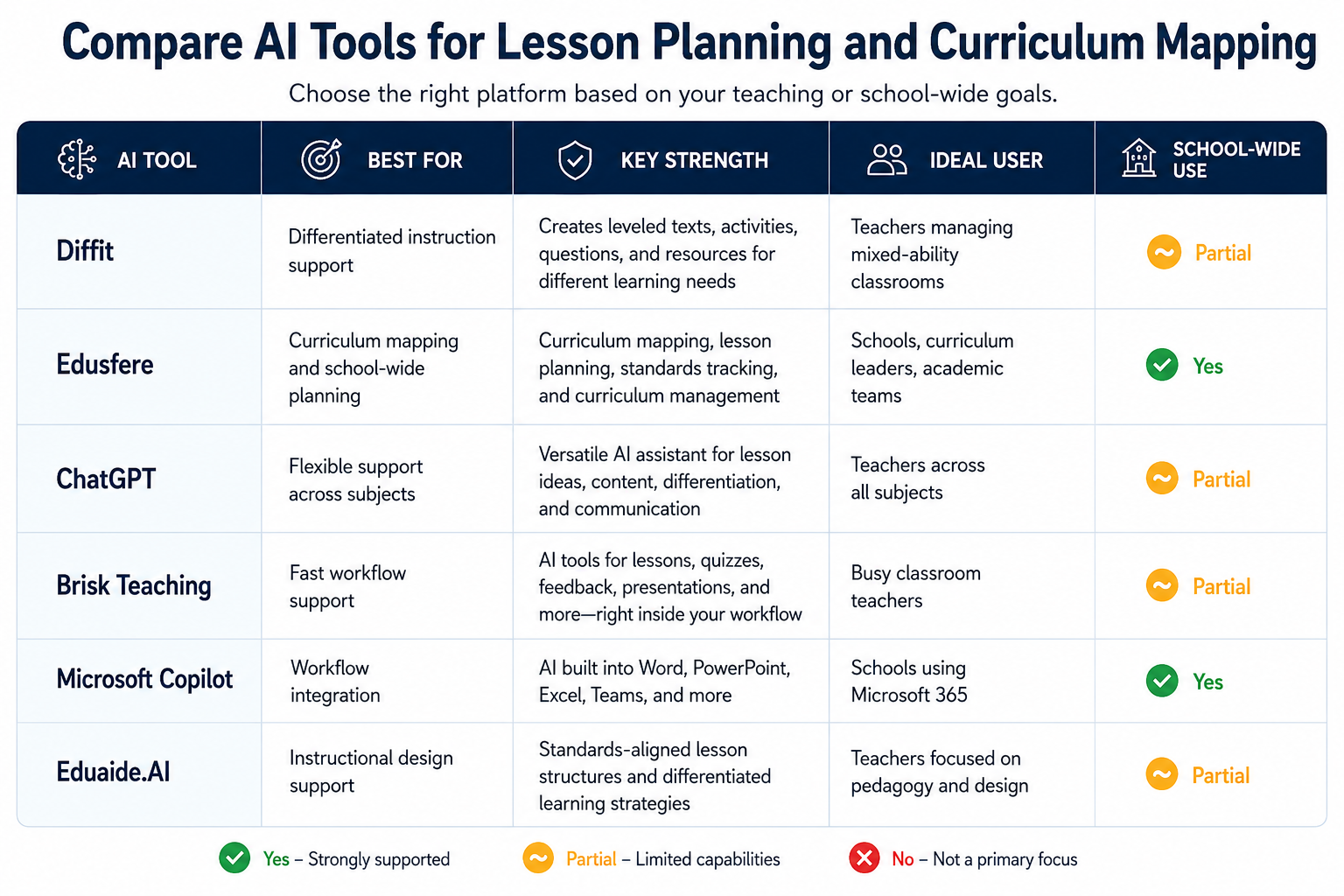
Compare AI Tools for Lesson Planning and Curriculum Mapping
How AI Supports Curriculum Mapping and Curriculum Management
Strong schools do more than plan tomorrow’s lesson. They build coherent learning journeys across the year and across grade levels. This is where AI can create strategic value through curriculum mapping software and broader curriculum management systems. AI can help schools:
- Identify gaps in standards coverage
- Reduce duplication across grades
- Align assessments to outcomes
- Strengthen progression between year levels
- Build shared planning resources
- Update curriculum plans more efficiently
- Improve visibility for academic leaders
For leaders, this means better oversight. For teachers, clearer direction. For students, more consistent learning experiences.
Best Practices for Teachers Using AI
AI can be a powerful teaching assistant, but the best results happen when it is used thoughtfully rather than automatically. It works best when teachers remain in control of quality, classroom context and final decisions. Used well, AI can save time, generate fresh ideas and reduce repetitive planning work. But teacher expertise is still essential for judging what is accurate, age-appropriate, inclusive and genuinely useful for students.
The most effective approach is teacher-led AI use, where technology supports professional judgement instead of replacing it.
Start with clear prompts
Include grade level, subject, learning objective, duration and learner needs.
Review every output
Check accuracy, tone, reading level and classroom suitability.
Add human context
AI does not know your students the way you do. Add local examples, pacing needs and classroom relationships.
Use AI for drafting, not judgment
AI can generate options quickly, but instructional decisions belong to educators.
Share what works
Departments can build prompt libraries and effective workflows together.
Common Mistakes Schools Should Avoid When Implementing AI
Many schools invest in AI tools with good intentions but see limited results because adoption is rushed, fragmented or driven by hype rather than clear academic goals. The strongest outcomes usually come from thoughtful implementation, staff readiness and a clear link between technology and teaching quality.
Here are some of the most common mistakes schools should avoid:
1. Using AI outputs without teacher review
AI can generate useful first drafts. But outputs are not always accurate, age-appropriate or aligned to classroom context. Teachers should review and refine all materials before use.
2. Ignoring curriculum Alignment
A lesson may look engaging but still fail to support required standards or learning outcomes. AI should strengthen curriculum delivery, not distract from it.
3. Adopting tools without a clear strategy
Using multiple disconnected tools can create duplication, confusion and inconsistent practices across departments. Schools benefit most when AI adoption supports a defined planning or curriculum strategy.
4. Underestimating privacy and governance
Student data protection, responsible use policies and clear guardrails matter in K-12 settings. Schools should evaluate how platforms store data and how staff are expected to use them.
5. Replacing professional judgement with automation
AI can save time, but it should not replace teacher expertise, relationship knowledge or instructional decision-making. Human judgement remains central to quality teaching.
6. Not providing training to staff
Even strong tools underperform when teachers are not trained to use them effectively. Basic support in prompting, reviewing outputs and classroom use can significantly improve results.
7. Measuring activity instead of impact
The goal is not to use AI more. The goal is better planning, reduced workload, stronger alignment and improved learning experiences. Schools should track outcomes, not just tool usage.
Schools that succeed with AI usually start with a focused use case, run small pilots, gather feedback and scale what genuinely improves teaching and learning.
Frequently Asked Questions
Which AI tool is best for lesson planning?
For fast daily lesson planning, many teachers prefer Diffit . For flexible custom planning, ChatGPT is a strong option. For school-wide planning and curriculum mapping, Edusfere is better suited.
Can AI help with curriculum mapping?
Yes. AI can help identify gaps, overlaps, standards coverage issues, progression challenges and planning inconsistencies across grades or subjects.
What is curriculum mapping software?
Curriculum mapping software helps schools organise what is taught, when it is taught, how it aligns to standards and how learning progresses across year levels.
Are AI tools safe for K-12 schools?
They can be. But schools should review privacy policies, data handling, governance controls and responsible use practices before adoption.
Can teachers use AI for differentiated instruction?
Yes. AI can quickly generate scaffolds, extensions, simplified texts and alternative activities for learners with different needs.
The Bigger Opportunity: From Faster Lesson Planning to Smarter School Systems
The most valuable AI tools for teachers are not the ones that simply generate content fastest. They are the ones that help educators save time, improve lesson quality, personalise learning and collaborate more effectively.
For individual teachers, that can mean less time spent building materials from scratch and more time focused on feedback, relationships and student progress.
For K-12 schools, the opportunity is even larger. AI can move beyond daily lesson creation to strengthen curriculum mapping, improve curriculum management and bring greater visibility to what is being taught across subjects, grades and academic terms.
When implemented strategically, AI can help schools:
- Reduce teacher workload without lowering quality
- Improve alignment to standards and learning outcomes
- Identify gaps, duplication or pacing issues early
- Build more consistent learning experiences across classrooms
- Support better planning decisions for academic leaders
- Create more time for high-value teaching and student support
The schools that gain the most from AI will not be those using the most tools. They will be the ones using the right tools with clear goals, strong governance and a focus on better learning outcomes.
Bring Better Planning and Curriculum Visibility to Your School
Edusfere helps schools simplify lesson planning, strengthen curriculum mapping and keep academic planning aligned across grades and subjects. Whether you are trying to reduce planning chaos, improve consistency between classrooms or gain clearer oversight of curriculum delivery, Edusfere gives your team one place to plan with confidence.
If your school is exploring better lesson planning or curriculum management, we are here to help.
Schedule a demo today!
Reviewed by:
Grant Wootten, Founder & CEO, Edusfere