
Ask most AI lesson planning tools to help and they'll hand you a finished plan with objectives, activities, sequencing; all generated from a one-line prompt. It looks efficient. It's also a quiet handoff of judgement that the AI is now choosing how a topic gets taught, not just helping document it.
Edusfere draws that line differently. Teachers decide. AI captures. Nothing walks out the door.
Two flagship Edusfere features put that principle into practice. Smart Assist, which turns a teacher's own activity idea into a structured lesson entry and Lesson Importer, which brings a teacher's existing lesson plans into Edusfere's curriculum map. Both reduce the time lesson planning takes. Neither one decides what happens in the classroom.
Why AI-Generated Lesson Plans Should Make School Leaders Pause
Type a topic into a typical AI planning tool and it returns a full lesson including activities, sequence, even pacing; built from scratch by the model.
For a busy teacher, that's tempting. For a curriculum director, it's a liability. Here's the real problem. Once AI is generating the instructional content itself, nobody can say with confidence whose judgment is actually reflected in that lesson plan. Did the teacher choose that activity because it fits their students or because the model suggested it? Is the lesson aligned to the standard because the teacher mapped it there or because the AI guessed correctly?
When curriculum audits and alignment checks depend on knowing the answer, "we're not sure" isn't an acceptable answer.
Edusfere's lesson planning tools are built to avoid that problem entirely. They organize and structure what a teacher already knows; they don't generate what a teacher hasn't decided.
AI Smart Assist: From a Three-Word Idea to a Documented Lesson Plan
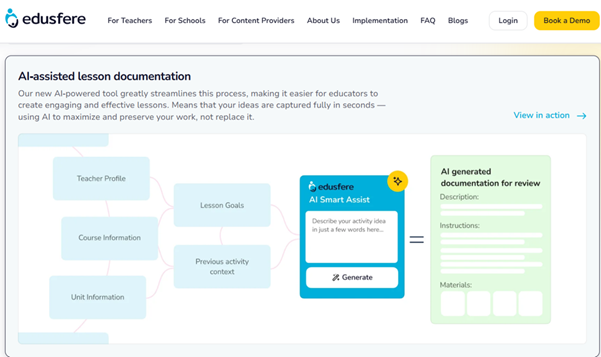
Every teacher knows the gap between having an idea and writing it up. Smart Assist closes that gap without touching the idea itself. A teacher types a short description of an activity, as little as three words or as much as a couple of paragraphs. For instance, "stations activity comparing photosynthesis and respiration" is enough. Smart Assist reads that alongside the course, unit and lesson it belongs to, and proposes the supporting detail a full lesson entry needs: prep steps, instructional steps and objective tags.
What the teacher decided. What Smart Assist filled in
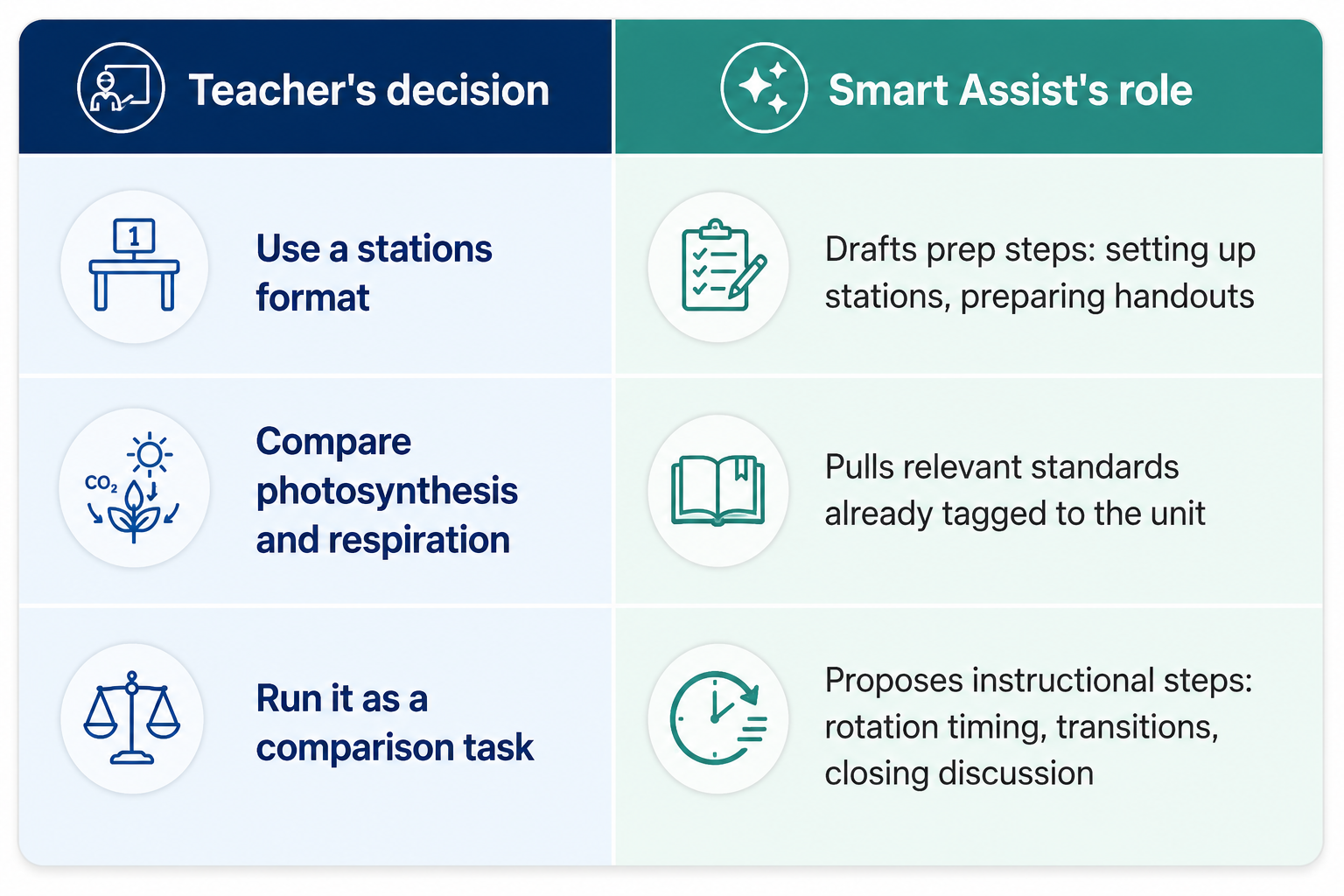
Nothing in that table is a pedagogical choice Smart Assist made. The teacher chose the format, the content and the cognitive task before Smart Assist ever ran. What it added is the scaffolding underneath, the kind of detail that's necessary for a complete lesson plan but tedious to type out by hand every time.
Every suggestion is editable. A teacher might want six stations instead of four or a different closing prompt and Smart Assist's draft is just that - a draft, not a final answer. Nothing saves to the curriculum map without the teacher's review. In seconds, what would've been a sticky note becomes durable documentation.
Why this matters beyond time saved
When documentation is fast, teachers actually keep it current. That means curriculum directors get a fuller, more accurate picture of what's happening across classrooms; not because anyone is being checked up on but because the lesson plans people are already creating in their heads finally make it into the system.
Lesson Importer: Bringing Years of Existing Work into One Curriculum Mapping System
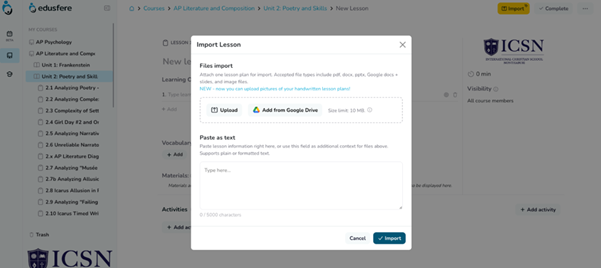
Smart Assist helps with lessons being built today. Lesson Importer solves an older problem, i.e., the years of lesson plans already sitting in personal drives, shared folders and files inherited from a teacher who left. Migrating that material into a new curriculum mapping system is usually where platform switches stall out. Re-typing years of lesson plans by hand takes long enough that most schools quietly skip it and the institutional knowledge stays scattered exactly where it was before.
Lesson Importer is built to remove that bottleneck. A teacher pastes or uploads a lesson plan in whatever format it already exists in. Edusfere places it into the right course, unit and lesson, then writes out the corresponding activities, objectives and details inside that structure. The function here is translation, not creation.
The lesson plan's content including its activities, sequencing, objectives already exists; a teacher wrote it, sometimes years ago. The Lesson Importer's job is to read that material accurately and represent it inside a structured curriculum map, rather than leave it stranded in a format disconnected from the rest of the school's curriculum. This solves two problems at once:
- For onboarding teams: Migrating a backlog of existing lesson plans into a new platform stops being a multi-month manual project.
- For institutional continuity: When a teacher changes grade levels, switches schools or retires, their accumulated work doesn't have to disappear with them. It's already captured in a shared system.
The Same Rule, Applied Two Ways
Smart Assist and Lesson Importer solve opposite problems ; one builds forward, one brings the past in. But they run on the same rule, which is, AI infers and organizes; it never originates the instructional decision. That's a meaningful distinction, not a marketing line.
Using AI to format, structure or surface implementation detail based on what a teacher has already decided is a legitimate, time-saving use of the technology. Using AI to decide what a lesson should cover is a different category of tool entirely, one that quietly shifts pedagogical authority away from the person actually accountable for it.
A question worth asking any curriculum platform that markets "AI lesson planning" is: Does the AI ever generate instructional content the teacher didn't already determine? If yes, some portion of instructional judgment has moved from the teacher to the AI model, whether or not that was the intent.
Edusfere's answer is no.
What This Means for Curriculum Management Fidelity and Oversight
For administrators, this isn't just a philosophical stance. It's what makes curriculum fidelity monitoring trustworthy in the first place. When a curriculum director reviews lesson plans across a school or district, they need to know that those plans reflect real instructional decisions made by real teachers, mapped to real standards. If AI were quietly generating gaps in that picture, every alignment check built on top of it, whether vertical, horizontal or otherwise, would be standing on uncertain ground.
Because Smart Assist and Lesson Importer only document decisions teachers have already made, the lesson plans that come out the other side hold up under that kind of scrutiny. Administrators get speed and visibility without sacrificing the accuracy of what's actually being reviewed.
When Schools Typically Use Each Teacher Resource
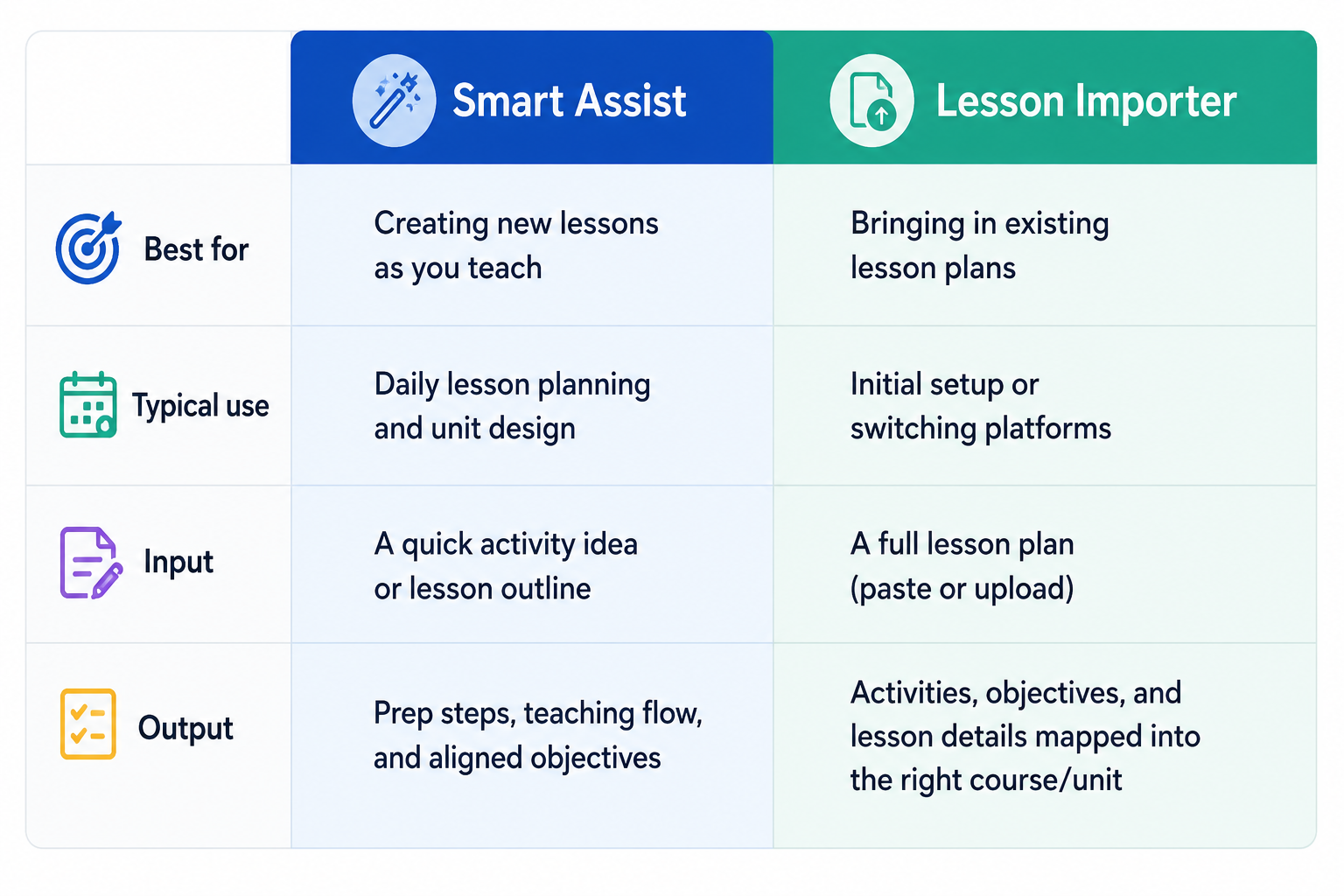
Used together, the two features cover both directions of lesson planning, viz., capturing new instructional decisions as teachers make them and preserving the decisions they've already made in years past. Neither asks a teacher to hand judgment over to an algorithm; both just make it faster to write that judgment down.
For school leaders comparing curriculum mapping software, that's the test worth applying. Does the tool save teachers time without taking their decisions out of their hands? Smart Assist and Lesson Importer were both built to answer yes.
Frequently Asked Questions (FAQs)
Does Edusfere's AI write lesson plans for teachers?
No. Edusfere's AI features infer implementation details like prep steps or objective tags from instructional decisions a teacher has already made. The AI never decides what should be taught; that decision always stays with the teacher.
What's the difference between Smart Assist and Lesson Importer?
Smart Assist turns a brief activity description into a structured lesson entry for new lessons. Lesson Importer takes an existing lesson plan, written before a school used Edusfere and places it into the platform's course and unit structure.
Can teachers edit what Smart Assist or Lesson Importer produce?
Yes. Every output from both features is fully editable before it saves. Teachers retain full control over what ends up in the final lesson plan.
How is this different from other AI lesson planning tools?
Many platforms generate complete lesson plans from a single topic prompt, which shifts pedagogical decisions toward the AI. Edusfere's features are scoped narrowly to documentation and formatting, the instructional decisions stay with the teacher.
Does Smart Assist work for any subject or grade level?
Yes. Because Smart Assist draws on the course, unit and lesson context a teacher has already set up in Edusfere, it adapts to whatever subject and grade level that context reflects; there's no separate configuration needed per subject.
The best curriculum management platforms don't replace what teachers bring to the classroom. They make sure it doesn't disappear when teachers leave the building. Every lesson plan a teacher carries in their head, every activity refined over years of practice, every decision made in the specific context of a specific group of students – that's institutional knowledge. And right now, in most schools, it's one resignation letter away from being gone.
Edusfere's Smart Assist and Lesson Importer were built to change that; not by automating the teacher's job but by making it faster to document the work they're already doing. The instructional decisions stay where they belong, i.e., with the teacher in the room. What Edusfere captures is the record of those decisions , durable, structured and still there when the next teacher walks in.
That's what it means to use AI responsibly in a K-12 school. Not a shortcut around the teacher's judgment. A system built to preserve it.
Reviewed by: Grant Wootten, Founder & CEO, Edusfere
Resources & Further Reading
- https://edusfere.com/ai-tools-for-teachers-6-best-platforms-for-lesson-planning-curriculum-mapping-an/
- https://edusfere.com/teachers/
- https://edusfere.com/the-back-to-school-curriculum-planning-review-7-checks-every-school-should-compl/
- https://edusfere.com/how-can-curriculum-mapping-improve-new-teacher-onboarding-guide/
- https://edusfere.com/the-future-of-curriculum-management-key-insights-for-teachers-and-instructional-designers/
- https://www.youtube.com/watch?v=sPLBv2qyqkc
- https://edusfere.com/ai-in-curriculum-planning-explained-a-practical-guide-for-school-leaders-in-2026/