
Key Takeaways:
- Legacy curriculum management software is a static system that hasn't kept pace. These systems continue to rely on scattered drives, paper binders and email approvals instead of real-time collaboration.
- Modern platforms centralize lesson plans, standards alignment and administrator visibility in one place instead of spreading them across personal files.
- Teacher turnover costs $12,000-$25,000 per hire. When plans live only in personal files, replacing a teacher means rebuilding lost curriculum knowledge too.
- 84% of teachers say a normal workday doesn't leave enough time for planning and grading.
- In Edusfere's model, AI tools only structure what a teacher already decided to teach. They never generate lesson plans on their own.
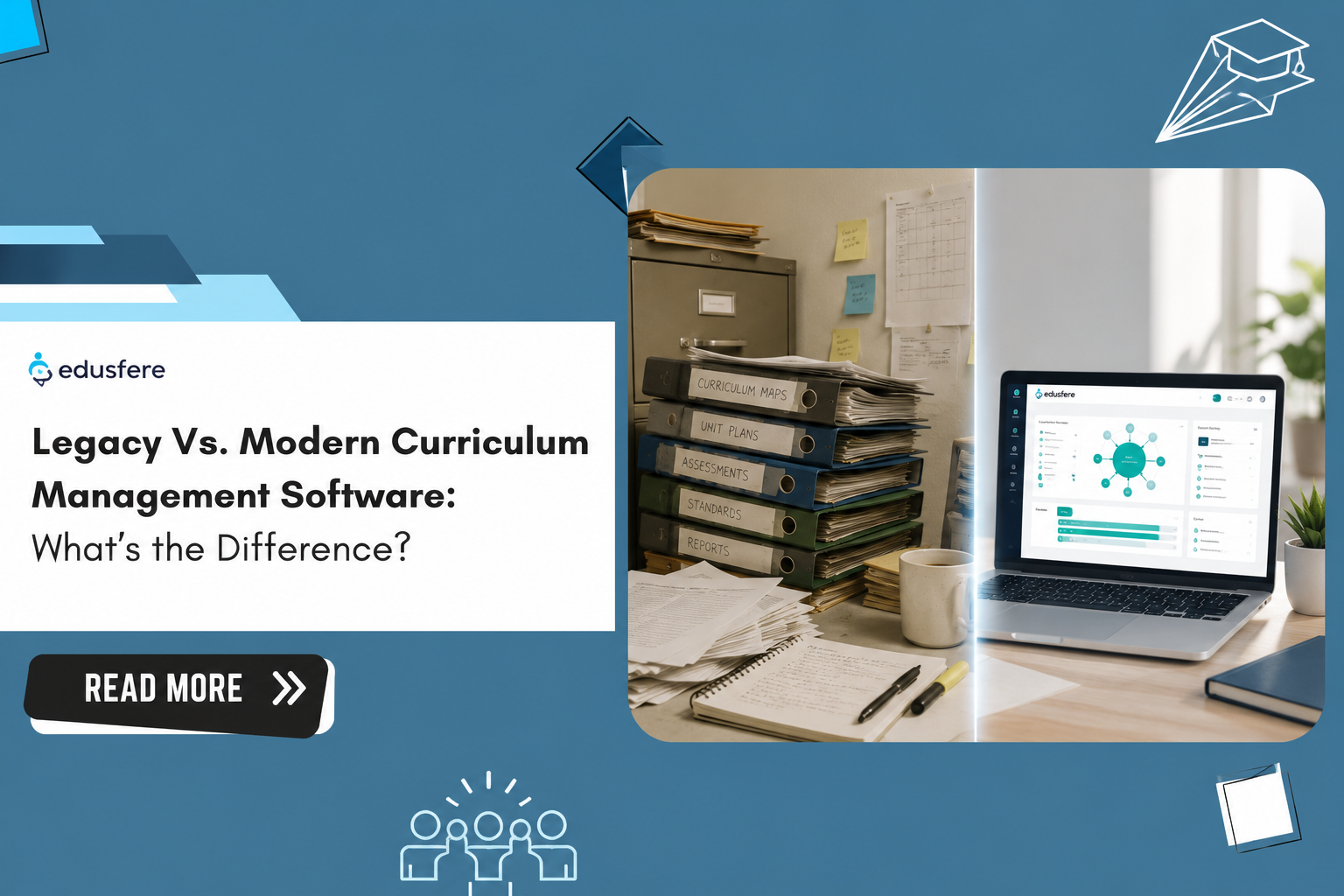
Ask five teachers in the same building where to find last year's unit plans and you'll likely get five different answers; a shared drive, a binder in a filing cabinet, an old email thread, a colleague's laptop. That's legacy curriculum management. It isn't always old software. Often, it's no software at all. Just a patchwork of habits the school built out of necessity.
Modern curriculum software replaces that patchwork with a single system. The short answer is a legacy curriculum management scatters lesson plans and standards records across binders, personal drives and email with no shared system tying them together. A modern curriculum software centralizes all of it; lesson planning, standards alignment and administrator visibility in one connected, cloud-based system.
That difference isn't cosmetic. It changes how fast standards updates reach classrooms, how much a new hire has to rebuild from scratch and how much a principal actually knows about what's being taught on any given day. Neither term refers to a specific product. They're two different operating models for the same job - getting standards-aligned instruction into every classroom, consistently, without losing what's been built along the way.
Here's what separates the two and why the gap matters more in 2026 than it did five years ago.
What Legacy Curriculum Management Actually Looks Like
Legacy doesn't mean a specific product; it's rarely a deliberate choice. It's what accumulates when a school never adopts a dedicated system, a set of workarounds that quietly becomes the default. Here's what that usually looks like:
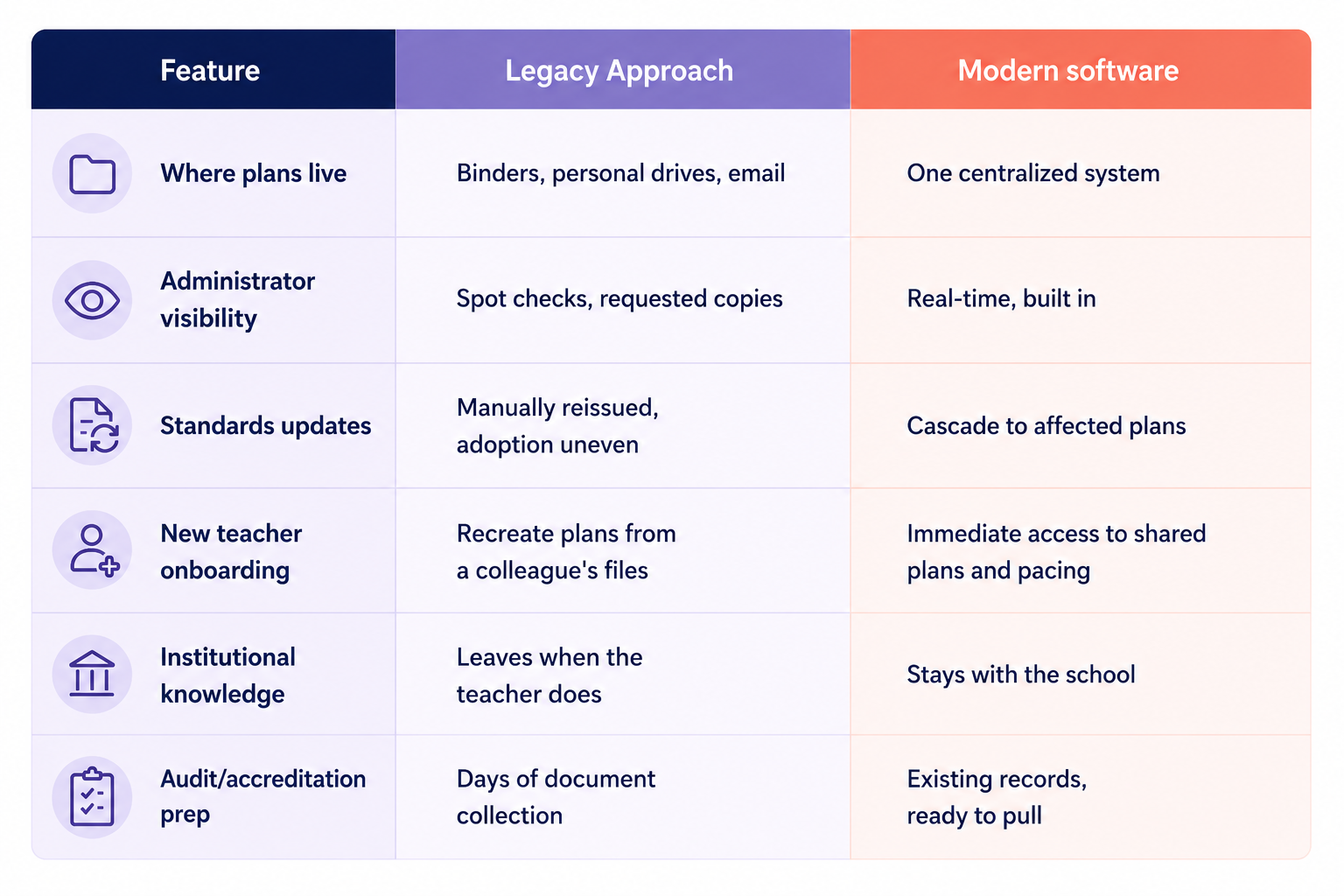
- Lesson plans live in personal spaces: Binders, individual Google Drives, desktop folders. If a teacher leaves mid-year, their plans often leave with them.
- Administrators see snapshots, not the whole picture: Visibility comes from spot checks or requested copies, not a standing view into what's being taught.
- Standards updates travel by email or PDF: There's no reliable way to confirm every teacher applied the change or even opened the message.
- Every classroom builds its own version of ‘aligned’: Without a shared structure, instructional coherence depends on individual habits, not a system.
- New teachers start from zero: Onboarding means asking a colleague for their old files and reverse-engineering the pacing.
- Curriculum audits take weeks, not hours: Confirming that instruction actually matches what was adopted means chasing down documents from a dozen different sources before anyone can even start comparing them.
None of this reflects poorly on the people doing the work. It's what happens when a curriculum management tool is heavily dependent on general-purpose tools, instead of one that takes care of every aspect of curriculum management function as a whole. A binder system and a shared drive can both work, for a while, in a small school with low turnover. They tend to break down exactly when a school can least afford it. For instance, during mid-year staffing changes, a state standards revision or an accreditation review that asks for evidence, not assurances.
What a Modern Curriculum software Looks Like
Modern curriculum management software is cloud-based and centralized by design, not by workaround. Curriculum management platforms like Edusfere are built around a few core shifts:
- One place to plan, one place to check: Centralized lesson planning means every unit and lesson lives in a system tied to course and standards context, not scattered across personal drives.
- Administrators see plans as they're built, not after the fact: Visibility isn't a favor a teacher grants, it's built into the software.
- Updates cascade instead of getting re-announced: When a standard or pacing guide changes upstream, the update flows down to the lessons and units it affects, rather than depending on every teacher to manually apply it.
- Pacing lives on a shared instructional calendar: This helps leaders can see how plans map to the school year without cross-referencing five spreadsheets.
- New hires inherit context, not a blank page: Prior plans, pacing and standards alignment are already there to build from.
- Confirming alignment doesn't mean chasing documents down first: Because plans already live in a structured system tied to standards, the records are already there when someone needs to check them.
The shift isn't just about convenience. It changes who can answer basic questions about instruction and how quickly.
The table below breaks down the practical difference.
Why the Difference Matters More Right Now
Three pressures make this comparison less theoretical in 2026 than it was even a couple of years ago.
Turnover keeps making the gap expensive
According to the Learning Policy Institute's latest national turnover data, roughly one in seven public school teachers leaves their school or the profession each year. The cost per hire lands in the tens of thousands.The Institute's current estimates run around $12,000 in a small district and $25,000 in a large one. When lesson plans exist only in a departing teacher's personal files, that cost isn't just recruiting and onboarding. It's rebuilding curriculum knowledge that already existed and simply walked out the door.
Teachers already don't have time to spare
A recent Pew Research Center survey put a number on the problem. 84% of teachers report that a normal school day doesn't leave room for everything on their plate including grading, planning, paperwork and email. RAND's national survey of instructional material use points to a related strain. Teachers who adopt a new resource mid-year take on roughly half an hour more planning time per week than colleagues sticking with familiar materials, a gap that compounds across a year of standards updates and material swaps. A software that keeps plans, pacing, and standards context in one place doesn't eliminate that workload, but it removes the extra time lost to searching, reformatting and reconciling versions.
Legacy infrastructure is now a stated risk, not just an inconvenience
District technology reporting heading into 2026 increasingly treats outdated, disconnected systems as a security exposure, not just a productivity drag; a shift that's pulling curriculum decisions and IT decisions into the same conversation at more districts than before.
Where AI Fits And Where It Doesn't
Most software marketed as modern now includes some form of AI assistance. That's a real point of difference from legacy tools but it's also where school leaders should ask the most questions.
Edusfere's approach starts from one boundary, i.e., the teacher decides what to teach. Smart Assist takes a short activity description, anywhere from a few words to a couple of paragraphs and combines it with course and unit context to infer prep steps, instructional steps and objective tags. Meanwhile, Lesson Importer works differently. It takes a plan the teacher already wrote, places it into that same course and unit context and writes out the activities and objectives already in it. Neither tool starts from a blank prompt and neither one decides what gets taught. The teacher reviews and edits everything before it's final. Our rule for this:
"Teachers decide. AI captures. Nothing walks out the door."
That distinction, AI as a capture tool versus AI as a decision-maker, is worth asking about with any software, not just this one.
How Do You Know You've Outgrown Legacy Curriculum Management?
Here’s a quick self-check. if any of these are hard to answer in under a minute, the gap is already costing you:
- Could you say what's being taught in 6th grade math this week without emailing three people?
- When a teacher leaves mid-year, does their replacement inherit the plans or start over?
- How long does it actually take for a standards or pacing change to show up in every affected classroom? Is it days or most of a semester?
- Is more of your curriculum stored in staff memory than in any single system?
If those questions are hard to answer quickly, the gap between legacy habits and modern software isn't abstract. It's showing up in onboarding time, planning time, audit prep and how confidently a principal can describe instruction on any given day. None of this requires abandoning what already works. Strong lesson design, experienced teachers and good pacing decisions don't come from software; they come from people. What modern software changes is where that work lives once it's made, i.e., in a system the whole school can see and build on, instead of a folder that only one person can find.
The tools have changed. The goal hasn't. Teachers spend less time rebuilding what already exists. Leaders get a real answer when someone asks what's being taught, right now, in any classroom.
Frequently Asked Questions (FAQs)
1. What counts as "legacy" curriculum management?
Any setup where lesson plans and standards records live in scattered personal spaces including binders, shared drives, email threads, instead of one connected system. It doesn't require old software; many legacy setups involve no dedicated software at all.2. What's the main difference between legacy and modern curriculum softwares?
Centralization. A modern curriculum management software keeps lesson planning, standards alignment and administrator visibility in one cloud-based system, so information doesn't depend on any single person's files or memory.3. Does a modern curriculum management software take lesson planning control away from teachers?
Not in Edusfere's model. The teacher decides what to teach. AI tools like Smart Assist and Lesson Importer only help capture and structure detail the teacher has already provided; they don't generate plans from a blank prompt.4. Why does this matter for school leaders right now, specifically?
Teacher turnover, lack of time to plan and growing scrutiny of outdated tech infrastructure are all raising the real cost of not having one source of truth for curriculum.See what a modern curriculum management software looks like inside your own school
Edusfere replaces the binder-and-shared-drive patchwork with one connected system centralized lesson planning, real-time administrator visibility and standards updates that reach every classroom without a re-announcement.
Book a demo to see it against your own curriculum
Resources and Further Reading
- https://learningpolicyinstitute.org/product/teacher-turnover-united-states-report
- https://www.pewresearch.org/social-trends/2024/04/04/how-teachers-manage-their-workload/
- https://www.rand.org/pubs/research_reports/RRA134-30.html