

Key Takeaways
- FACTS SIS supports student information and school operations.
- Edusfere supports curriculum mapping and management.
- Both platforms serve different, complementary needs.
- Schools should confirm integration capabilities before implementation.
Schools use different systems to manage student information and academic planning. But these systems serve different purposes. A student information system helps schools manage student records and daily operations. Curriculum management software helps educators plan, document and review what students learn.
FACTS SIS and Edusfere serve these two distinct needs. Understanding their roles can help school leaders see how they fit into a school's technology ecosystem.
What Is FACTS SIS?
FACTS Student Information System (SIS) is part of the FACTS suite of school management solutions. It helps schools manage student information and related academic and administrative processes. Depending on the products and configuration a school uses, FACTS can support functions such as student records, attendance, grading, scheduling and family communication. These tools help school teams organize information and manage daily responsibilities.
However, student information management and curriculum management are not the same. Student records show important information about learners. They do not provide a complete picture of how learning objectives progress across grades or how curriculum standards align with instruction. That is where curriculum management plays a separate role.
What Is Edusfere?
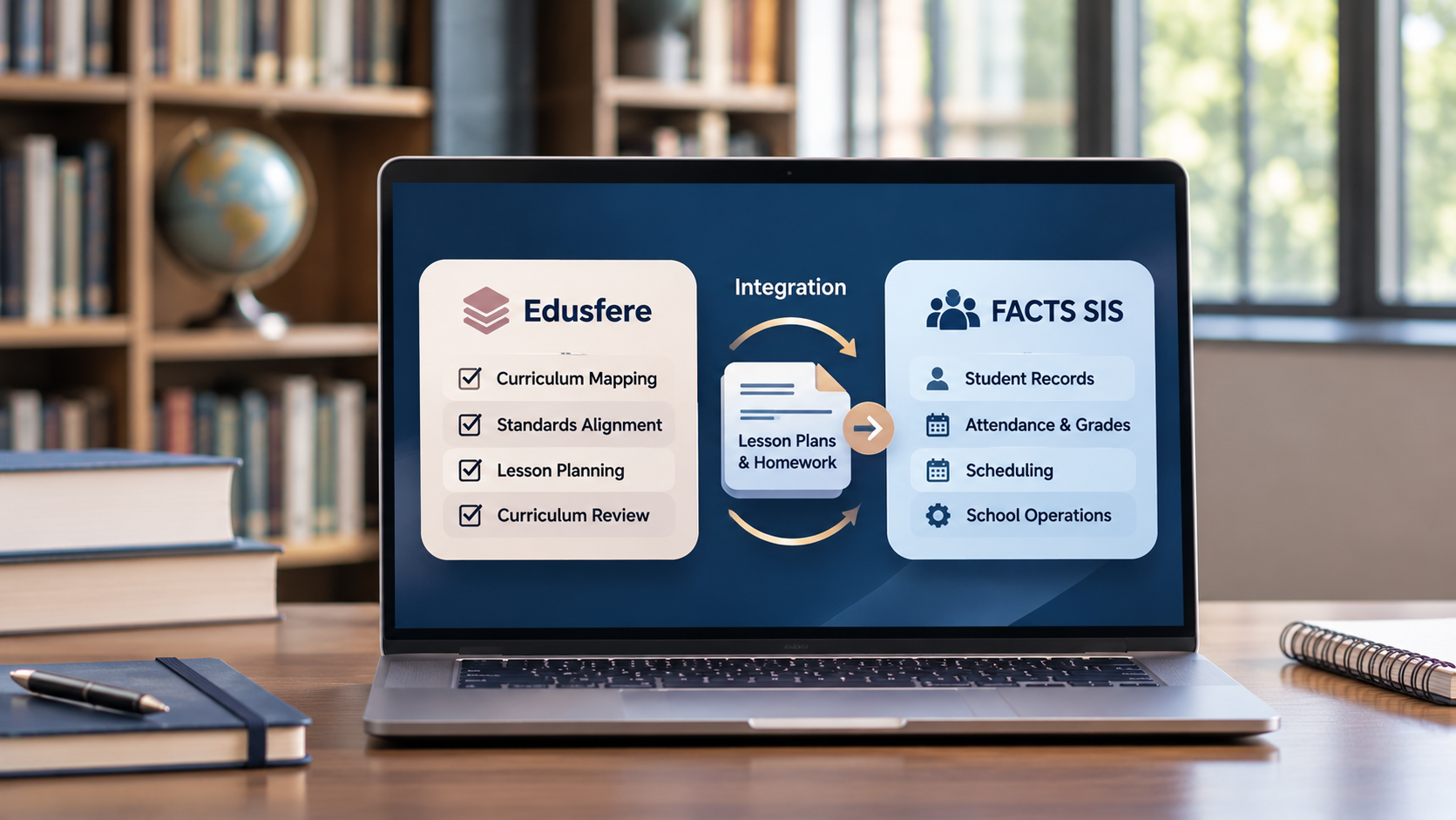
Edusfere is a curriculum management platform designed for K-12 schools. It helps educators organize curriculum maps, lesson plans, standards and instructional resources. Instead of managing these materials across disconnected documents, schools can use Edusfere to bring curriculum information into a shared environment. Its core capabilities support several important tasks include:
Curriculum mapping: Document learning objectives, units, standards and curriculum progression.
Standards alignment: Connect curriculum plans with relevant academic standards.
Lesson planning: Organize lesson plans within the broader curriculum structure.
Curriculum visibility: Review what is planned across grades and subjects.
Teacher collaboration: Give educators a shared foundation for curriculum planning and review.
These capabilities help schools build a more structured approach to curriculum management.
What Does the FACTS SIS and Edusfere Integration Mean for Schools?
FACTS SIS and Edusfere address different needs within a school's technology environment.
FACTS SIS supports student information management and school operations. Edusfere's new FACTS integration lets teachers push their lesson plans and homework into FACTS with one click. Edusfere focuses on curriculum mapping, lesson planning and curriculum oversight.
For school leaders, the integration offers an opportunity to consider how these areas fit into their wider technology ecosystem. The exact functionality matters. Schools should confirm which workflows the integration supports and whether any information moves between the platforms. They should also clarify any setup requirements and limitations.
These details should not be assumed. The available capabilities need to be verified with FACTS and Edusfere. The goal is to understand how the integration fits the school's existing systems and academic priorities.
Why Curriculum Management Matters Alongside Student Information Management
A school can manage student records effectively and still struggle to maintain a consistent view of its curriculum. Curriculum information often sits across spreadsheets, shared drives and individual lesson plans. This can make it harder to review learning objectives, identify gaps and coordinate planning across departments.
A structured curriculum management process helps schools address the following challenges:-
1. Track Curriculum Progression
Curriculum mapping helps teachers document what students should learn at each stage. It also helps school leaders review how knowledge and skills develop across grade levels. They can identify gaps, overlaps and areas that need more attention.
2. Support Standards Alignment
Schools need to know how their curriculum aligns with academic standards and learning goals. Curriculum management software helps educators document these connections. It also makes curriculum review more organized.
3. Improve Teacher Collaboration
Teachers often plan lessons and units independently. Without a shared reference, it can be difficult to maintain consistent expectations.
A common curriculum framework gives teachers a starting point for collaboration. They can review learning objectives, coordinate unit plans and discuss instructional priorities.
4. Preserve Curriculum Knowledge
Curriculum knowledge should not depend on individual teachers or their personal files. Structured documentation helps schools retain important information when staff members change roles or leave. It also gives new teachers a clearer starting point.
5. Make Curriculum Review Easier to Manage
Curriculum mapping should be an ongoing process, not a task completed only before an audit. Organized documentation helps school leaders revisit standards alignment, learning objectives and curriculum progression. They can then make informed decisions about what needs updating.
These benefits come from effective curriculum management practices. They should not be treated as guaranteed outcomes of the FACTS SIS and Edusfere integration.
Who Is the FACTS SIS and Edusfere Integration Meant For?
The integration may be relevant to schools that use FACTS SIS and want to explore Edusfere for curriculum management. Different school teams may have different reasons to evaluate it.
School Principals and Heads of School
School leaders oversee daily operations and academic priorities. They need to understand how their technology supports both. The integration may be worth exploring as part of a broader review of school systems.
Curriculum Directors and Academic Coordinators
These professionals oversee curriculum documentation, standards alignment and planning across grades and subjects. Edusfere's curriculum mapping capabilities may be relevant to their work. They can evaluate how the platform fits their existing curriculum processes.
Department Heads and Instructional Leaders
Department heads coordinate planning across teachers and grade levels. Clear curriculum documentation gives them a shared reference for reviewing learning objectives and curriculum progression.
School Administrators and Technology Decision-Makers
These teams evaluate software, manage existing systems and coordinate implementation. They need to understand what each platform does and how the integration works. Compatibility, access requirements and implementation responsibilities should be confirmed before moving forward.
What Should Schools Consider Before Exploring the Integration?
Before evaluating the integration, schools should start with their current needs. A few practical questions can help guide the process.
1. What Does Our FACTS SIS Setup Support?
Review the FACTS products and features your school currently uses. Available capabilities may vary by configuration.
2. How Do We Manage Curriculum Mapping Today?
Look at how your school documents learning objectives, standards, units and lesson plans.
Are these materials easy to access and review? Do teachers work from shared documents or separate files? Are curriculum maps consistent across departments?
These questions can reveal where your current process needs improvement.
3. What Do We Want to Improve?
Some schools may want better curriculum visibility. Others may focus on standards alignment, teacher collaboration or documentation. Define your priorities before evaluating new software. This makes it easier to assess whether a solution meets your needs.
4. What Does the Integration Actually Support?
Confirm which workflows are supported, whether data is exchanged and what permissions or limitations apply. Do not assume that every feature available in either platform is included in the integration.
5. What Will Implementation Require?
Ask about setup, staff responsibilities, training and ongoing support.
Understanding these requirements will help your school plan the next steps.
Frequently Asked Questions
What is FACTS SIS?
FACTS Student Information System supports student information management and related school operations. Available features depend on the products and configuration used by the school.
What is Edusfere used for?
Edusfere helps K-12 schools manage curriculum mapping, lesson planning, standards alignment and curriculum documentation.
How is curriculum management different from student information management?
Student information management focuses on student records and school operations. Curriculum management focuses on learning objectives, standards, instructional plans and curriculum progression.
Both are important, but they serve different purposes.
Why might a school using FACTS SIS consider Edusfere?
A school may consider Edusfere if it needs a more structured approach to curriculum mapping and management. The integration's suitability depends on the school's needs and the capabilities confirmed by the providers.
Does the integration automatically sync student records and curriculum data?
The exact data exchange and synchronization capabilities must be confirmed with FACTS and Edusfere. Schools should not assume that student records, grades, attendance or curriculum maps automatically transfer between the platforms.
Which schools should explore the integration?
Schools that use FACTS SIS and want to evaluate their curriculum management processes may find it relevant. They should first assess their needs and confirm the integration's capabilities.
Bringing School Operations and Curriculum Planning Together
School technology works best when each system has a clear purpose.
FACTS SIS supports student information management and school operations. Edusfere helps schools organize curriculum mapping, lesson planning and standards alignment.
For schools exploring the integration, the next step is to understand how the platforms fit into their existing environment. Confirming the available functionality will help school leaders make an informed decision.
The objective is simple. Give school teams the right tools to manage information and plan learning effectively.
Explore Edusfere to see how structured curriculum mapping and curriculum management can support your school's academic planning.