
Inside This Blog
- What are the options for schools exiting from CurriculumTrak
- Common CurriculumTrak limitations as schools grow
- CurriculumTrak vs. Edusfere: A Feature Comparison
- What to look for in modern curriculum management software
- Where AI fits without replacing teacher judgment
- Frequently Asked Questions
Schools currently using CurriculumTrak are facing a defined transition: the platform is scheduled to officially sunset in December 2027 and it is redirecting new customers to another platform. That gives schools time to plan their next move but it also creates an opportunity to look beyond simply replacing one system with another.
For many schools, the priorities are straightforward - connect curriculum maps, unit plans and lesson plans into a more cohesive system; give leaders better visibility into standards coverage without relying on manual report-building; and support collaborative curriculum review without forcing teachers and administrators to work across email, spreadsheets and shared documents.
The right fit ultimately depends less on feature count and more on how well a platform supports the way your school manages curriculum day to day.
Common CurriculumTrak Limitations Schools Have Been Facing
CurriculumTrak has supported schools with curriculum mapping and lesson planning for years. With the legacy curriculum management software heading to sunset by December 2027, schools now need to evaluate other modern curriculum management software to keep up with the demands of the hour. Nevertheless, here some of the key limitations of CurriculumTrak that schools have been reporting over the years:
Curriculum fragments over time
Without tight connections between maps, unit plans and lesson plans, departments drift toward different formats and update cadences. Tracking what changed and where, gets harder as the curriculum grows.
Collaboration moves outside the platform
Even schools with curriculum software often finish real collaborative work in email threads, shared drives or Google Docs before uploading a final version. The platform becomes a filing system rather than the place work actually happens.
Reviews take longer than they should
Answering "where are our standards gaps?" or "which units haven't been reviewed?" often means manually cross-referencing documents and spreadsheets; turning a strategic conversation into an administrative one.
Workload creeps up quietly
Teachers rarely blame the software directly. They experience it as searching for files, rebuilding lesson plans that already exist somewhere and duplicating work across systems.
Curriculum management looked different a decade ago. Most schools needed a central repository, a place to store curriculum maps and unit plans instead of shared drives and binders. That bar has moved. School leaders are now expected to maintain consistency across grade levels, support real-time teacher collaboration, produce accreditation evidence on demand and adapt curriculum quickly as standards and priorities shift.
Schools Transiting from CurriculumTrak: What to Look For In a Modern Curriculum Management Software?
Moving on from CurriculumTrak gives schools an opportunity to do more than replace one system with another. It is a chance to step back and consider what teachers, curriculum leaders and administrators actually need from their next curriculum management platform.
The right choice won't necessarily be the platform with the most features. It should be the one that fits your school's curriculum workflows, is practical for teachers to use every day, gives leaders the visibility they need and can be implemented without creating unnecessary disruption or cost. Here are a few areas worth evaluating before making a decision.
Technology That Connects the Curriculum
Start with the fundamentals. Curriculum maps, courses, units, lessons, standards and other planning elements should work together rather than exist as disconnected pieces of information.
A modern curriculum management software should make it easier to trace the relationship between what the school intends students to learn and what teachers are actually planning and delivering in the classroom. It should also be flexible enough to accommodate changes in standards, curriculum frameworks, programs and school priorities over time.
A User Experience Teachers Will Actually Adopt
A platform can look impressive in an administrator demo and still be frustrating for teachers. Pay attention to the everyday experience.
How easy is it to find a course or unit? How quickly can a teacher create or update a lesson? Can teachers collaborate without moving the work into email or shared documents? Does the system reduce repetitive work or simply introduce another set of steps?
Teacher adoption is critical. Curriculum management only works when the people responsible for creating and using the curriculum can work comfortably within the system.
Leadership Visibility Without More Administrative Work
School leaders need more than access to curriculum documents. They need a practical way to understand what is happening across grades, subjects and departments.
The next platform should make it easier to review curriculum coverage, identify gaps or duplication, monitor standards alignment and understand where curriculum may need attention; without requiring administrators to manually assemble information from multiple sources.
That visibility becomes particularly valuable during curriculum reviews, accreditation preparation and strategic curriculum planning.
Data Migration: Understand Exactly What Moves; And What Doesn't
For schools transitioning from CurriculumTrak, migration deserves particular attention.
Don't settle for a general promise that "your curriculum will be migrated." Ask vendors to explain exactly what they will transfer, what teachers will need to bring over themselves, how archived content will be handled and how the school will validate the migrated information.
Edusfere, for example, migrates course and unit information from the previous system, shared drives and any digital format. Only active courses are pulled automatically, so administrators need to activate archived courses they want preserved in Edusfere. Lesson plans work differently. Teachers bring their own existing lesson-plan information into Edusfere rather than having it directly transferred by the migration team. This approach reflects the differences between Edusfere's lesson-planning structure and legacy platforms, while also putting teachers in the best position to review and preserve the details of their own instructional plans.
Edusfere provides import tools and AI-supported features to help make that process faster, along with a copy-and-paste option when a file isn't directly uploadable.
For schools using a migration service, Edusfere recommends allowing at least two weeks between providing access to the existing system and the administrator onboarding. This is to ensure that the team has time to set up the migrated information and resolve any missing details.
That level of specificity is what schools should look for from any vendor they evaluate.
Implementation Time and Support Matter as much as Data Migration
Getting data into the new system is only one part of implementation. Teachers need time to learn the new workflow. Administrators need time to review migrated information, customize the platform and establish expectations before teachers begin using it.
Edusfere's onboarding process separates these stages. After the initial implementation discussion, administrators receive their own onboarding session before teacher training. This gives school leaders time to review the system, make decisions and prepare expectations for staff.
Teacher onboarding can then be structured around the school's needs. Some schools begin with an early-adopter or pilot group, while other schools may split teacher training into multiple sessions. During training, teachers work directly on Edusfere’s software using their own devices and lesson-plan materials, giving them an opportunity to learn the system by actually using it.
Implementation also doesn't simply end when the training call is over. The assigned Customer Service Manager follows up with schools after onboarding, including check-ins around the first month, three months, the end of the school year and the start of the next school year.
For a transition of this scale, that ongoing support can be just as important as the initial migration.
5. Consider the Total Implementation Cost, Not Just the License Fees
Price is obviously part of the decision, but schools should look at the broader cost of changing platforms. That includes the time administrators and teachers will spend preparing for migration, reviewing content, attending training, adapting workflows and supporting adoption after launch.
A platform with a lower upfront cost isn't necessarily the lower-cost option if implementation requires significant internal effort. Conversely, strong migration support, structured onboarding and ongoing customer support can reduce the amount of work the school has to absorb internally.
The Best Platform Has to Work for Both Teachers and Leaders
Ultimately, a curriculum management platform has two very different audiences. Teachers need a system that helps them plan, collaborate and manage curriculum without adding unnecessary administrative work.
Curriculum leaders and administrators need visibility, consistency, reporting and the ability to understand curriculum across the school. The strongest platforms don't force one group to compromise for the other. They create a connected experience where better teacher workflows also give leaders better information to work with.
That's the standard schools should aim for as they plan their next step after CurriculumTrak.
Advantages of Switching to a Modern Curriculum Management Software
Most curriculum management softwares check the same boxes on paper, including standards alignment, lesson planning, reporting and collaboration tools. Feature lists alone rarely tell you which platform will actually reduce work for your school. The more useful test is whether curriculum maps, unit plans and lesson plans function as one connected system rather than separate files that happen to reference each other.
It's also worth looking at whether collaboration, standards visibility and curriculum review can happen within the same workflow.
For schools planning their next platform, a few practical considerations can help clarify the difference.
- Can teachers collaborate on curriculum without defaulting to email or shared docs?
- Are curriculum maps, unit plans and lesson plans connected or do they live as separate files that happen to reference each other?
- Can leaders identify standards gaps or overlap without a manual review cycle?
- Will teachers actually adopt it or will it become another system to work around?
Migration deserves equal scrutiny. A well-run migration starts with understanding your existing curriculum structure, not just transferring files. In Edusfere's process, for example, course and unit data is migrated directly from the previous system, while lesson plans are re-entered by teachers using import tools built for the purpose. The rationale behind this is that teachers know their own lesson plans better than a migration team would. Edusfere's lesson planner is structured differently enough from most legacy systems that a direct transfer wouldn't hold up anyway. Only active courses carry over by default, so archived material a school wants to keep needs to be flagged ahead of time.
Schools should expect this level of specificity from any vendor they evaluate. A migration plan should make clear what transfers automatically, what requires teacher or administrator input, how archived content is handled and how much lead time the school needs.
How Edusfere Fits As The Next Best Alternative Platform
These considerations are also where Edusfere takes a different approach to curriculum management. Edusfere brings courses, units, lesson planning, standards and curriculum workflows into one connected environment, while keeping the teacher at the center of instructional decisions.
The transition process is designed around the reality that not every piece of existing curriculum should or can be moved in exactly the same way. Course and unit information can be migrated from the existing system, while teachers take ownership of bringing their lesson plans into Edusfere using supported import tools and AI-assisted features.
Just as importantly, system implementation extends beyond the initial data transfer. Administrators receive dedicated onboarding before teachers, teacher training can be structured around the school's size and rollout approach, and follow-up continues well beyond the initial launch. For schools preparing for the CurriculumTrak sunset, that combination matters. The goal isn't simply to move the curriculum into a new system. It's to make the transition manageable while giving teachers and school leaders a more connected way to work with curriculum going forward.
CurriculumTrak vs. Edusfere: Curriculum Management Software Comparison
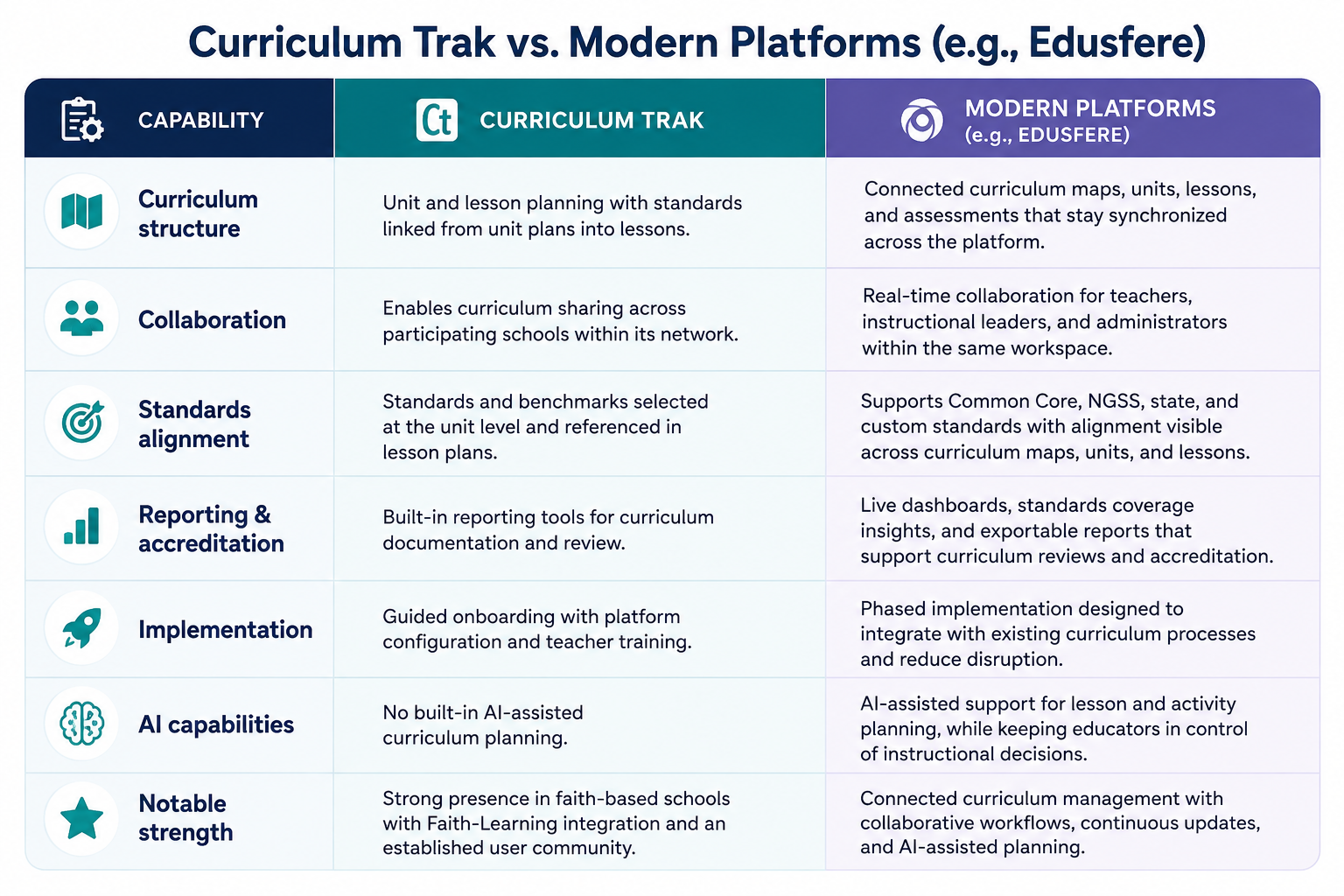
(Note: Feature details for CurriculumTrak sourced from its public features documentation)
AI in Curriculum Management Software: Where It Fits Without Replacing Teacher Judgment
AI is increasingly becoming part of the curriculum-platform conversation. But the distinction that matters isn't whether a platform has AI, it's what the AI is allowed to decide.
Edusfere's approach is built on a simple principle. Teachers decide, AI captures, nothing walks out the door. Tools like Smart Assist don't generate lesson content or make instructional choices. A teacher describes an activity in a few words or a couple of paragraphs and Smart Assist combines that with existing course and unit context to infer prep steps, instructional steps and objective tags. The teacher reviews and edits everything before it's part of the record. The AI's role is inference from context the teacher already provided, not authorship.
That distinction is worth asking about directly when evaluating any platform marketing "AI-powered lesson planning": is the AI helping a teacher move faster on decisions they're already making or is it making instructional decisions for them?
Frequently Asked Questions
What should schools using CurriculumTrak do before it sunsets?
Schools currently using CurriculumTrak have time to plan ahead of the December 2027 sunset. A sensible first step is to review the curriculum currently stored in the platform, identify active versus archived content, understand what needs to be migrated and begin evaluating potential replacement platforms. Starting early also gives teachers and administrators time to become familiar with the new system before the transition is complete.
What actually distinguishes modern curriculum management software from legacy tools like CurriculumTrak?
The core difference is how tightly curriculum maps, unit plans and lesson plans are connected; and whether collaboration and standards visibility happen inside the platform in real time or require manual assembly.
How disruptive is switching platforms?
It depends on the migration approach more than the software itself. A phased rollout that layers onto existing workflows, rather than a single cutover, significantly reduces disruption for teachers.
What should schools prioritize when comparing platforms?
Schools need to check for fit with existing workflows, ease of teacher adoption. What's equally important is how much manual work is required to produce standards and accreditation evidence, not just the length of the feature list.
Does AI in curriculum software mean it's generating lesson plans?
It shouldn't. AI can support lesson planning without writing it for the teacher. When evaluating a vendor's AI claims, ask specifically whether the AI infers implementation details like prep steps, instructional steps from context the teacher already provided, with the teacher reviewing and editing everything or is it making those decisions on its own. That distinction determines who's actually in control of instruction.
Ready to see if Edusfere can work for your school specifically?
Schedule a personalized demo to walk through migration, standards alignment and teacher workflows side by side.